I started the year using Makin the Grade as my grading program. Our district has a site license so I invested in the OS X platform version and began using it. In the past, I have always created my own grade books using Excel. I'd merge these into our report cards which were in MS Word. This worked better than what teachers had been doing before, but the spreadsheets always became complex enough that they had trouble merging correctly. We figured out tedious work arounds, and it was still quicker than working by hand, but it wasn't ideal.
My district uses an online report card system. Merging grades into it from Excel or any other program isn't an option, so I decided to use Makin the Grade. I tried it for a term, but it didn't fit me well and my middle-age eyes found it difficult to track across the screen.
A friend and colleague was also questioning whether it was the best program for him to use, so he did some research and settled on Easy Grade Pro. It has suited my work style and been much easier for me to read and to locate information.
All worked fine until yesterday when I printed out Almost End of the Term grade slips to help my students track their progress. Normally I print a summary of each category at the top and then include an itemized list of all missing assignments at the bottom. This time, the summary at the top would list X number of missing assignments, but then there would be nothing listed in the itemized section. I hadn't noticed this discrepancy, but a few of my astute students did.
It took me a while to track down the problem. In the assignment set up window, one of the settings had somehow been changed so that the assignments were supposed to be included in the scoring but excluded from reports. I have no memory of toggling on that setting, but once on, all new assignments carry that attribute until you choose a new one. Normally this is a useful feature-- as long as you are awake enough to notice what you are doing. Fortunately, my furniture ships to Singapore on the 31st. Hopefully after that I'll be a bit more aware of what I'm doing on the job.
There. That's probably far more than you wanted to know, but hopefully of use to someone.
Wednesday, May 24, 2006
Friday, May 12, 2006
Do You Have a Favorite Children's Book?
What's your favorite children's book (besides Harry Potter)? If you have a few minutes, please go to my new Vaestro channel and tell us about it.
Vaestro is a new, free, online service that lets anyone set up a channel where people can have an asynchronous voice discussion. You don't need to sign in or subscribe; to leave a comment, just go there and take part. All you need is a microphone. I just used the tiny pin hole microphone on my iBook and it worked quite well.
To add your comment, click on the reply button, then click the record button and start talking. Don't worry; you get to listen to your recording before it is posted. It is up to you to delete or approve it.
If you experience technical difficulties, anything from the site being blocked by your school's filters to the URL not working, please post me a comment here. I'm asking all of your to be my guinea pigs before I release the link to my students. Thanks for you assistance.
Vaestro is a new, free, online service that lets anyone set up a channel where people can have an asynchronous voice discussion. You don't need to sign in or subscribe; to leave a comment, just go there and take part. All you need is a microphone. I just used the tiny pin hole microphone on my iBook and it worked quite well.
To add your comment, click on the reply button, then click the record button and start talking. Don't worry; you get to listen to your recording before it is posted. It is up to you to delete or approve it.
If you experience technical difficulties, anything from the site being blocked by your school's filters to the URL not working, please post me a comment here. I'm asking all of your to be my guinea pigs before I release the link to my students. Thanks for you assistance.


Wednesday, May 10, 2006
Arianna's Nutrition Expedition
I'm working on a nutrition unit with my fifth graders. My pre-testing showed that with a few exceptions, my students do not already know the information I plan to teach. The students who did score 15/20 points on the pretest had been playing around on my SchoolNotes page over the weekend and had already tried out many of the resources. I found it encouraging that students are voluntarily using the resources on my site even before I introduce them.
I started the unit by setting up a journal in Moodle in which students told me what they knew and wanted to know about nutrition. Next, they took a pre-test in Moodle. I adapted it from the pre-test provided in Arianna's Nutrition Expedition, a nutrition unit available online from the National Dairy Council. In the past, I've shied away from teaching materials from groups with a vested interest, but these resources are excellent, not merely an advertising venue for the council.
As they finished the pretest, they played the Blast Off! game I mentioned here to expose them to the ideas and information they will be learning. Next, we began using the lessons in Arianna's Nutrition Expedition. I found the lessons very age-appropriate. They held my students' interest and engaged them in thinking about the topics being taught. For example, after an adventure story that taught about the different food groups in the food pyramid, the students completed a worksheet in which they had to identify which foods were placed in the wrong groups. I heard students having good discussions with each other as they tried to figure out which foods were misplaced. After that, they responded to journal questions.
The final activity was to go to the lab and play the first of four online computer games that are part of the unit. We played Quintricious! First students had to use colored eye droppers to label each food to indicate the food group to which it belonged. Each pair of students were stumped by a few foods. Peanut butter was the trickiest overall-- many pairs of students had to try it in all of the wrong groups before figuring out it went in the meat group. This gave us a natural lead-in to helping them rename the group to the Meats, Beans and Nuts group. This will become clearer after we start discussing the nutrient basis for assigning foods to groups.
When the foods were all assigned to the correct group, the game took the students through three levels of a Tetris-style game where they matched up foods from the same food group. This part of the game was well-scaffolded. In level one, all the foods retained the color coding the students had given them. By level three, there were no clues as to what food group each food belongs.
I hope the worksheets and games continue to cause spontaneous, focused discussions occur. I tend to shy away from science worksheets in general because they tend to require such low level thinking, but these are doing just what they should. If you teach fourth or fifth grade and have a nutrition unit at your grade level, I hope you find these resources useful.
I started the unit by setting up a journal in Moodle in which students told me what they knew and wanted to know about nutrition. Next, they took a pre-test in Moodle. I adapted it from the pre-test provided in Arianna's Nutrition Expedition, a nutrition unit available online from the National Dairy Council. In the past, I've shied away from teaching materials from groups with a vested interest, but these resources are excellent, not merely an advertising venue for the council.
As they finished the pretest, they played the Blast Off! game I mentioned here to expose them to the ideas and information they will be learning. Next, we began using the lessons in Arianna's Nutrition Expedition. I found the lessons very age-appropriate. They held my students' interest and engaged them in thinking about the topics being taught. For example, after an adventure story that taught about the different food groups in the food pyramid, the students completed a worksheet in which they had to identify which foods were placed in the wrong groups. I heard students having good discussions with each other as they tried to figure out which foods were misplaced. After that, they responded to journal questions.
The final activity was to go to the lab and play the first of four online computer games that are part of the unit. We played Quintricious! First students had to use colored eye droppers to label each food to indicate the food group to which it belonged. Each pair of students were stumped by a few foods. Peanut butter was the trickiest overall-- many pairs of students had to try it in all of the wrong groups before figuring out it went in the meat group. This gave us a natural lead-in to helping them rename the group to the Meats, Beans and Nuts group. This will become clearer after we start discussing the nutrient basis for assigning foods to groups.
When the foods were all assigned to the correct group, the game took the students through three levels of a Tetris-style game where they matched up foods from the same food group. This part of the game was well-scaffolded. In level one, all the foods retained the color coding the students had given them. By level three, there were no clues as to what food group each food belongs.
I hope the worksheets and games continue to cause spontaneous, focused discussions occur. I tend to shy away from science worksheets in general because they tend to require such low level thinking, but these are doing just what they should. If you teach fourth or fifth grade and have a nutrition unit at your grade level, I hope you find these resources useful.
Tuesday, May 09, 2006
Different Flavors of Journals in Moodle
I last wrote that we were trying to use the assignment module as a tool for the ongoing journaling between each student and myself. I liked the privacy and that the text fields didn't become increasing narrow as the replies nested. Unfortunately, even when I selected the options for my comments to be in-line, it didn't work. My comments would not intersperse between their comments and the children found the whole venture very confusing.
Thankfully, pdzone left me a comment to my earlier post, suggesting I try the wiki module for my journals. I set it up with each student having their own wiki. The wikis are private; only the student and I can see or edit the wiki.
The students were glad we were abandoning the assignment-style journals and they loved the term wiki-wiki, so they were game to give it a try. Thus far, the wiki seem to be working. Students were a bit confused at first about how to add to the journal- the edit button wasn't an obvious choice, since in their minds, they weren't editing.
Students were also confused by what they saw after hitting the edit button. The cause of the problem is that to make the journals easier to read, I make my replies italic and blue-- the students are using an older web browser that doesn't give them formatting options. Since my text is formatted, when students click the edit button, my posts are encased in html coding. However, I showed them how to just click at the top of the edit box, add a few blank rows, and type their response, and they quickly adapted.
Our only real difficulty came last weekend when I went to make my first replies. I was using Firefox version 1.5.0.3. It appears that this new version doesn't play well with the Moodle wiki. I could start new wikis using it, but if I tried to edit an existing wiki, my additions disappeared when I hit the save button. After a frustrating ten minutes, I thought to switch to Netscape. This solved the problem.
I am excited that the wiki option is working because it is quicker; I spend less time waiting for Moodle pages to load. It seems to meet all our needs and since the pages don't fill as quickly, I won't need to keep switching us to a fresh set up. This is important since my students want to continue journaling after the school year is over. I love the idea, but don't want to spend a lot of time on upkeep. Now the challenge is to see if edit notification is available via email or RSS.
Thankfully, pdzone left me a comment to my earlier post, suggesting I try the wiki module for my journals. I set it up with each student having their own wiki. The wikis are private; only the student and I can see or edit the wiki.
The students were glad we were abandoning the assignment-style journals and they loved the term wiki-wiki, so they were game to give it a try. Thus far, the wiki seem to be working. Students were a bit confused at first about how to add to the journal- the edit button wasn't an obvious choice, since in their minds, they weren't editing.
Students were also confused by what they saw after hitting the edit button. The cause of the problem is that to make the journals easier to read, I make my replies italic and blue-- the students are using an older web browser that doesn't give them formatting options. Since my text is formatted, when students click the edit button, my posts are encased in html coding. However, I showed them how to just click at the top of the edit box, add a few blank rows, and type their response, and they quickly adapted.
Our only real difficulty came last weekend when I went to make my first replies. I was using Firefox version 1.5.0.3. It appears that this new version doesn't play well with the Moodle wiki. I could start new wikis using it, but if I tried to edit an existing wiki, my additions disappeared when I hit the save button. After a frustrating ten minutes, I thought to switch to Netscape. This solved the problem.
I am excited that the wiki option is working because it is quicker; I spend less time waiting for Moodle pages to load. It seems to meet all our needs and since the pages don't fill as quickly, I won't need to keep switching us to a fresh set up. This is important since my students want to continue journaling after the school year is over. I love the idea, but don't want to spend a lot of time on upkeep. Now the challenge is to see if edit notification is available via email or RSS.
Sunday, April 30, 2006
A Surprising Lack of Sophistication
Friday found my science classes in the good computer lab to take the pretest for our nutrition unit. With the remaining time, I had them play the My Pyramid BlastOff! game as a lead in to learning about the new food pyramid. It is one of the many resources available at the Mypyramid.gov website.
The game challenges students to fuel a rocket ship by planning a day's worth of balanced nutrition and physical activity. I expected that my video game savvy fifth graders would see right through it and easily blast off to the planet. I was wrong! They were fueling the rocket with the cookies, sugary cereals and soda that they normally drink, and they were all losing the game. That made me like the game all the more.
One strength is that the initial screen gives them a few quick guidelines. It wasn't much reading, but a number of students blew right past it anyway. Next, like any good video game, it doesn't tell you everything. For example, the food pyramid that dominates the screen has a fuel gauge on each of the food groups. The directions don't mention that you have a balanced diet when all the fuel gauges are at full. After a few losses, my students started figuring that out.
When your rocket ship goes up in a cloud of smoke, you get a screen that shows which parts of your diet were balanced and which weren't. After losing the game, I noticed students actually stopping to pour over that page.
What I liked the most was that I couldn't get students to quit playing to go to lunch, and a number of them asked if I would give them credit for beating the game if they finished it at home and printed out the certificate. The one student who did successfully complete the game admitted that she had been on my SchoolNotes page earlier in the week. She'd seen the link and had played the game at home a few times. Gotta love that!
In any case, I think it was a good anticipatory set and with the carrot of getting to play the game at the end of the unit, I think their studies will seem more purposeful and be more focused. Not a bad payoff for 20 minutes at a website.
The game challenges students to fuel a rocket ship by planning a day's worth of balanced nutrition and physical activity. I expected that my video game savvy fifth graders would see right through it and easily blast off to the planet. I was wrong! They were fueling the rocket with the cookies, sugary cereals and soda that they normally drink, and they were all losing the game. That made me like the game all the more.
One strength is that the initial screen gives them a few quick guidelines. It wasn't much reading, but a number of students blew right past it anyway. Next, like any good video game, it doesn't tell you everything. For example, the food pyramid that dominates the screen has a fuel gauge on each of the food groups. The directions don't mention that you have a balanced diet when all the fuel gauges are at full. After a few losses, my students started figuring that out.
When your rocket ship goes up in a cloud of smoke, you get a screen that shows which parts of your diet were balanced and which weren't. After losing the game, I noticed students actually stopping to pour over that page.
What I liked the most was that I couldn't get students to quit playing to go to lunch, and a number of them asked if I would give them credit for beating the game if they finished it at home and printed out the certificate. The one student who did successfully complete the game admitted that she had been on my SchoolNotes page earlier in the week. She'd seen the link and had played the game at home a few times. Gotta love that!
In any case, I think it was a good anticipatory set and with the carrot of getting to play the game at the end of the unit, I think their studies will seem more purposeful and be more focused. Not a bad payoff for 20 minutes at a website.
How Do They Do That?
Okay, maybe someone out there can explain this to me. It seems that almost any time I mention an online app or service in this blog, I receive a helpful comment from someone associated with the company. I love their responsiveness. I've often learned timely, helpful information from these commenters. My only question is, how do they know I wrote about them?
I know there are things like Trackback, but I thought the poster had to do something to invoke it. Are they Googling their name? Is Technorati that quick to pick up hits? To test that, I went to Technorati and typed in eMates, since that was something I posted on recently. However, it didn't pull up my post. I tried it with a few other terms and still no luck, so that isn't how it works.
If anyone does know how this works, let me know. I'm intrigued.
[Upate: I think I figured it out. I went to Google's blog search and entered the same terms and they pulled my blog up in the first few hits. Not surprising since my blog is at Blogger which is owned by Google. Smart strategy on the part of start-ups!]
I know there are things like Trackback, but I thought the poster had to do something to invoke it. Are they Googling their name? Is Technorati that quick to pick up hits? To test that, I went to Technorati and typed in eMates, since that was something I posted on recently. However, it didn't pull up my post. I tried it with a few other terms and still no luck, so that isn't how it works.
If anyone does know how this works, let me know. I'm intrigued.
[Upate: I think I figured it out. I went to Google's blog search and entered the same terms and they pulled my blog up in the first few hits. Not surprising since my blog is at Blogger which is owned by Google. Smart strategy on the part of start-ups!]
Thursday, April 27, 2006
An Update
Arranging for my move to Singapore and keeping afloat at work are consuming every waking moment, which is why I've been posting so rarely. Here's an update.
For the past two weeks, when we weren't taking state tests, our time in the computer lab was spent writing DARE essays. For my communications class, I once again used Moodle to give students feedback. As before, it seemed to be an effective conferencing tool for my students and keep my from lugging piles of essays back and forth each night.
Starting next week, the NCLB testing will monopolize our computer lab completely, so this week we put a burst of energy into our blogs. On Monday I was out sick. I lifted my blogging lesson for the reserve teacher directly from Clarence Fisher's blog post on Supporting Discourse. As usual, a few kids were completely untouched and are showing no change in their commenting. However, a number of them are trying out the comment starters that Clarence found on Anne Davis' blog. For most of them, it still sounds a bit awkward. However, I am a firm believer in honoring approximations as students develop new skills. Hopefully they will soon own these new tools.
I've been streaking with the software side of things. The Superglu page I set up to make a one-stop link to our blogs is finally behaving. I quit making changes, so I assume it was technical difficulties with their servers. Now I'm struggling with Blogmeister. Some of the time, I receive email letters with comments to approve. When I click on the link to approve them, instead of a window popping open in my web browser that announces, "Comment Approved!", I get the message that no record exists. I'm getting a fairly high number of these. They never have a name with them, so I can't tell if it is one of our own students or one of our visitors. Luckily, the comment is visible in the email, so I show that to my students.
Final challenge at the moment is to find a painless way to track student blog posts through the writing process. In the past, I taught a number of courses at Hamline University. Participation in online forums via Blackboard was a mandatory part of the course. Since I found myself tracking those from home, school, and on campus, I set up a database in my PDA. Each student was a record. Each assignment was a field. The system worked well.
Since then, the software I used has gone out of business. I thought of using an Excel spreadsheet so I could mail merge it with a report card, but my Quickoffice never installed correctly and the company refused to help. I thought of using one of the nifty, free online web app creation tools, such as ZohoCreator. I still might go that route, especially if I can download the data in some friendly format. Or, I might use the free Mobile DB program on my PDA, even though it won't play nicely with anything on my desktop. One thing is for sure. I won't be toting a piece of paper as a checklist. With my impending move, there are already far too many of those little papers in my life.
For the past two weeks, when we weren't taking state tests, our time in the computer lab was spent writing DARE essays. For my communications class, I once again used Moodle to give students feedback. As before, it seemed to be an effective conferencing tool for my students and keep my from lugging piles of essays back and forth each night.
Starting next week, the NCLB testing will monopolize our computer lab completely, so this week we put a burst of energy into our blogs. On Monday I was out sick. I lifted my blogging lesson for the reserve teacher directly from Clarence Fisher's blog post on Supporting Discourse. As usual, a few kids were completely untouched and are showing no change in their commenting. However, a number of them are trying out the comment starters that Clarence found on Anne Davis' blog. For most of them, it still sounds a bit awkward. However, I am a firm believer in honoring approximations as students develop new skills. Hopefully they will soon own these new tools.
I've been streaking with the software side of things. The Superglu page I set up to make a one-stop link to our blogs is finally behaving. I quit making changes, so I assume it was technical difficulties with their servers. Now I'm struggling with Blogmeister. Some of the time, I receive email letters with comments to approve. When I click on the link to approve them, instead of a window popping open in my web browser that announces, "Comment Approved!", I get the message that no record exists. I'm getting a fairly high number of these. They never have a name with them, so I can't tell if it is one of our own students or one of our visitors. Luckily, the comment is visible in the email, so I show that to my students.
Final challenge at the moment is to find a painless way to track student blog posts through the writing process. In the past, I taught a number of courses at Hamline University. Participation in online forums via Blackboard was a mandatory part of the course. Since I found myself tracking those from home, school, and on campus, I set up a database in my PDA. Each student was a record. Each assignment was a field. The system worked well.
Since then, the software I used has gone out of business. I thought of using an Excel spreadsheet so I could mail merge it with a report card, but my Quickoffice never installed correctly and the company refused to help. I thought of using one of the nifty, free online web app creation tools, such as ZohoCreator. I still might go that route, especially if I can download the data in some friendly format. Or, I might use the free Mobile DB program on my PDA, even though it won't play nicely with anything on my desktop. One thing is for sure. I won't be toting a piece of paper as a checklist. With my impending move, there are already far too many of those little papers in my life.
Friday, April 07, 2006
The Kindness of Strangers
One of the things I most appreciate about edubloggers as a whole is their kindness. This kindness translates into a willingness to share of their knowledge and time.
This was demonstrated to me again this week as our student blogs took off. I posted a short notice in the ClassBlogmeister discussion group announcing our blogs and asking for teachers and classes to stop by -- especially those who could model good commenting, since some of my students are STILL stuck in the chat room genre of commenting.
Within minutes of my post, two teachers had already gone in and left a few comments. Soon other teachers contacted me. One is going to have her middle school students visit. A fourth grade teacher added our blogs to their list of blogs to visit.
As always, these first comments had an electrical effect on my bloggers. They knew all along that their work would be on the Internet. As a result, many of them have spent more time than usual on revising and editing. However, it wasn't until they were reading comments from people in California and Italy that it really clicked for them. This is not just some assignment. This is real. Real people are reading and responding to what they have written.
Here's where I could get all sappy about the power of the pen, the importance of real world applications, the empowering effect of the red/write web. I'll spare you that, even though it all has me beaming. I'll just say that you for the kindness of edubloggers.
This was demonstrated to me again this week as our student blogs took off. I posted a short notice in the ClassBlogmeister discussion group announcing our blogs and asking for teachers and classes to stop by -- especially those who could model good commenting, since some of my students are STILL stuck in the chat room genre of commenting.
Within minutes of my post, two teachers had already gone in and left a few comments. Soon other teachers contacted me. One is going to have her middle school students visit. A fourth grade teacher added our blogs to their list of blogs to visit.
As always, these first comments had an electrical effect on my bloggers. They knew all along that their work would be on the Internet. As a result, many of them have spent more time than usual on revising and editing. However, it wasn't until they were reading comments from people in California and Italy that it really clicked for them. This is not just some assignment. This is real. Real people are reading and responding to what they have written.
Here's where I could get all sappy about the power of the pen, the importance of real world applications, the empowering effect of the red/write web. I'll spare you that, even though it all has me beaming. I'll just say that you for the kindness of edubloggers.
KWL via Moodle
I often use KWL charts at the start of a new unit to assess both what the students already know and what they want to learn. As I prepare our next health unit, I decided to use the journal module in Moodle rather than have them write their KWL on paper.
To my surprise, I seemed to get longer responses from them than I usually get on paper. This is especially surprising because the students who are not in my communications class have not spent much time keyboarding this year so their typing is a bit laborious. For most students, the spelling was highly inaccurate and a number of words were left out completely-- a sure sign that they aren't rereading what they write. I know that is typical of children, but I wish I had ideas on how to get them to reread-- ideas that do not involve lower grades or some other punishment. Ultimately, I don't want them to edit their work to get a good grade; I want them to edit their work because poor mechanics make it more difficult for their readers to understand the writer's message.
Using the journal module worked well because it is private- students can only see their own entry, no one else's, and because I can read all of the responses from one page rather than needing to click on each message as I must do in a forum or assignment module. I wonder what module I should have used so that they could add their "What I learned" section after the unit; journals only allow one entry from the student.
To my surprise, I seemed to get longer responses from them than I usually get on paper. This is especially surprising because the students who are not in my communications class have not spent much time keyboarding this year so their typing is a bit laborious. For most students, the spelling was highly inaccurate and a number of words were left out completely-- a sure sign that they aren't rereading what they write. I know that is typical of children, but I wish I had ideas on how to get them to reread-- ideas that do not involve lower grades or some other punishment. Ultimately, I don't want them to edit their work to get a good grade; I want them to edit their work because poor mechanics make it more difficult for their readers to understand the writer's message.
Using the journal module worked well because it is private- students can only see their own entry, no one else's, and because I can read all of the responses from one page rather than needing to click on each message as I must do in a forum or assignment module. I wonder what module I should have used so that they could add their "What I learned" section after the unit; journals only allow one entry from the student.
Thursday, March 30, 2006
Big Changes-- Singapore Ahead!
I'll keep this brief, but I am excited to announce that next year I will again be in S.E. Asia. Kent and I have accepted jobs at Singapore American School. He will teach grade 4 and I will be the IT Coordinator for the intermediate school.
This is a bittersweet announcement. I have finally figured out how to do my job here in Minnesota. I work for a gifted administrator. I work with a talented and dedicated staff. I have greatly enjoyed teaching this bunch of students who have been so willing to try whatever new bit of technology I placed before them. My school district welcomed me back after my previous leave, and now I am looking to leave again. Most difficult of all is the thought of once again leaving behind family and friends.
On the flip side is this opportunity to work at such a well-regarded school in a part of the world we enjoy. I'll once again be able to focus on technology integration, working with both students and staff. (Sometimes I need to pinch myself to believe that someone is willing to pay me to do work I enjoy so much.) I'll be teaching in a place with a strong, well-supported IT infrastructure.
We'll be living in a country that the UN human development index lists as one of the top ten countries in the world based on income, life expectancy and education. It is a tiny country located on an island that is approximately 26 x 14 miles in size. It has high population density, but then half of the land is set aside for parks, so maybe that balances out the crowding. It has excellent mass transit. I could go on and on, but I won't.
I wonder how this new job will change this blog? On one hand, technology integration will be much easier to implement there, but with strong programs already in place, there may be less room for exploring such as I've done with the eMates and Blogmeister and Moodle this year. However, I'm not worried; this is a fabulous opportunity for us.
In the mean time, we need to finish up this school year, rent the house and pack out. Anyone out there have any words of advice for two Minnesotans moving to Singapore?
This is a bittersweet announcement. I have finally figured out how to do my job here in Minnesota. I work for a gifted administrator. I work with a talented and dedicated staff. I have greatly enjoyed teaching this bunch of students who have been so willing to try whatever new bit of technology I placed before them. My school district welcomed me back after my previous leave, and now I am looking to leave again. Most difficult of all is the thought of once again leaving behind family and friends.
On the flip side is this opportunity to work at such a well-regarded school in a part of the world we enjoy. I'll once again be able to focus on technology integration, working with both students and staff. (Sometimes I need to pinch myself to believe that someone is willing to pay me to do work I enjoy so much.) I'll be teaching in a place with a strong, well-supported IT infrastructure.
We'll be living in a country that the UN human development index lists as one of the top ten countries in the world based on income, life expectancy and education. It is a tiny country located on an island that is approximately 26 x 14 miles in size. It has high population density, but then half of the land is set aside for parks, so maybe that balances out the crowding. It has excellent mass transit. I could go on and on, but I won't.
I wonder how this new job will change this blog? On one hand, technology integration will be much easier to implement there, but with strong programs already in place, there may be less room for exploring such as I've done with the eMates and Blogmeister and Moodle this year. However, I'm not worried; this is a fabulous opportunity for us.
In the mean time, we need to finish up this school year, rent the house and pack out. Anyone out there have any words of advice for two Minnesotans moving to Singapore?
Monday, March 27, 2006
The Moodle/Blogging Connection
Our student blogging project has taken a serendipitous turn. Students were writing their first blog entries in Blogmeister and submitting them for my approval. I was writing them carefully thought out responses, and then the responses were disappearing. Not all of them, but most of them. Not just once, but twice. Each time it took me well over an hour to comment, and now those comments are gone. Not Good.
I contacted the ClassBlogmeister discussion group but no one was able to offer any suggestions. What to do? These were the first student blogs in the school, maybe in the district. Oversight was definitely called for, but how to proceed?
I figured our most likely solution would involve our Moodle. I decided to create a blog post forum. Students could post their draft to the forum and then not only I but the rest of the class could conference with them on the piece by leaving replies. In addition to helping the children learn to conference on their writing, this could be the tool I was searching for to move them away from the inane, "Look at me!" type of responses they were currently leaving, to more thoughtful, helpful responses.
When I introduced it to the class, I tried to help them see that this was not the place to actually respond to the writing-- we'd do that in the comments section of the blog when the piece was published. Here in the forum, we are to respond to the following questions.
A new challenge with this solution is that the children are not able to revise their post in the forum. They could make the revisions in Appleworks and then add the revised piece to the forum as a new discussion item, but that separates the piece from the earlier comments. Another challenge is that it became difficult for me to track what I had read and what changes had been made by the writers. We needed to tweak this solution to solve these problems.
I have been playing around with wikis in another context so I decided to use the wiki module in Moodle. If the children created a new wiki page for each of their articles, the rest of the class could comment at the bottom of the page. The writer could continue to revise the article and the class could continue to comment until the piece was ready for publication. I thought tracking what needed to be read could be tricky, but this process would expose my students to a wiki, which is a goal I've had for a while.
Unfortunately, after I set up the wiki I realized that the Moodle wiki doesn't allow comments. I know that the Moodle folks are preparing to roll out a different wiki module. It was in beta testing the last time I checked.
Since the wiki wasn't solving our problem, I set up an assignment module. Now, students draft their blogs in Appleworks so that they can make use of the spell check. They post the drafts in the blog forum. They revise their drafts based on the feedback from peers and the submit the blog article in an assignment module.
Only the teacher and the writer can view the post in the assignment module, but the teacher can leave comments and the writer can make revisions right in the module. When the piece is ready for publication, they post it in Blogmeister and I publish it. It sounds ridiculously complex, but it has grown organically, so the children have been there each step of the way.
Most importantly, the children are writing and writing and writing. When they can't be in the computer lab, they are voluntarily using the eMates to draft their blogs. [They love to use the eMates.] Some children have written more in the past three weeks than they wrote for me all last term! And this doesn't take into account all the writing they are doing when they leave replies for other students. Along with this, our Moodle forum and assignment modules are allowing me to conference with each child, and for other voices to join in. It is creating a rich conversation. I'm eager to see where it goes.
I contacted the ClassBlogmeister discussion group but no one was able to offer any suggestions. What to do? These were the first student blogs in the school, maybe in the district. Oversight was definitely called for, but how to proceed?
I figured our most likely solution would involve our Moodle. I decided to create a blog post forum. Students could post their draft to the forum and then not only I but the rest of the class could conference with them on the piece by leaving replies. In addition to helping the children learn to conference on their writing, this could be the tool I was searching for to move them away from the inane, "Look at me!" type of responses they were currently leaving, to more thoughtful, helpful responses.
When I introduced it to the class, I tried to help them see that this was not the place to actually respond to the writing-- we'd do that in the comments section of the blog when the piece was published. Here in the forum, we are to respond to the following questions.
- Does the lead grab your attention and make you want to read more?
- What other parts of the blog post really held your attention? Why?
- What questions do you have after reading their post? Ask questions that will help them improve the article.
- Help them edit the mechanics if you notice mistakes.
A new challenge with this solution is that the children are not able to revise their post in the forum. They could make the revisions in Appleworks and then add the revised piece to the forum as a new discussion item, but that separates the piece from the earlier comments. Another challenge is that it became difficult for me to track what I had read and what changes had been made by the writers. We needed to tweak this solution to solve these problems.
I have been playing around with wikis in another context so I decided to use the wiki module in Moodle. If the children created a new wiki page for each of their articles, the rest of the class could comment at the bottom of the page. The writer could continue to revise the article and the class could continue to comment until the piece was ready for publication. I thought tracking what needed to be read could be tricky, but this process would expose my students to a wiki, which is a goal I've had for a while.
Unfortunately, after I set up the wiki I realized that the Moodle wiki doesn't allow comments. I know that the Moodle folks are preparing to roll out a different wiki module. It was in beta testing the last time I checked.
Since the wiki wasn't solving our problem, I set up an assignment module. Now, students draft their blogs in Appleworks so that they can make use of the spell check. They post the drafts in the blog forum. They revise their drafts based on the feedback from peers and the submit the blog article in an assignment module.
Only the teacher and the writer can view the post in the assignment module, but the teacher can leave comments and the writer can make revisions right in the module. When the piece is ready for publication, they post it in Blogmeister and I publish it. It sounds ridiculously complex, but it has grown organically, so the children have been there each step of the way.
Most importantly, the children are writing and writing and writing. When they can't be in the computer lab, they are voluntarily using the eMates to draft their blogs. [They love to use the eMates.] Some children have written more in the past three weeks than they wrote for me all last term! And this doesn't take into account all the writing they are doing when they leave replies for other students. Along with this, our Moodle forum and assignment modules are allowing me to conference with each child, and for other voices to join in. It is creating a rich conversation. I'm eager to see where it goes.
Tuesday, March 14, 2006
Slacker's Reward
I've had a wonderfully productive weekend.
First off, I explored a visually appealing beta wiki platform called Wet Paint. Not realizing they were still in beta, I created my first real wiki right in the middle of their feedback site (oops.) Realizing my error, I cut and paste each page from Wet Paint into Wikispaces. I had poked around at Wikispaces, but not really dug in to create something. I am starting to find my way. Today I discovered that I need to use double brackets to insert html code into the wiki. That should make it easier for me to get the pictures where I want them and make other adjustments.
The wiki I created at Wikispaces, is designed to assist teachers who decide to teach overseas. From what I see, there are many resources to help teachers secure an overseas job. However, once you land the job and need to back up your old live and get settled in a new country, there are fewer resources online. My wiki is an attempt to document what needs to be done to make that move a successful one. If you have something to contribute on that topic, please help edit the wiki. In an attempt to thwart at least a few of the spambots, I've set it up so that you must be a member of Wikispaces to edit the wiki. However, membership is free, so I hope that won't deter you from taking part.
In the course of creating the wiki, I finally downloaded my first picture from the Creative Commons section of Flickr. Flickr is set up to upload photos into your blog, complete with correct attribution to the photographer. I first attempted to move it from the blog to the wiki, but that was a failure, so I downloaded the photo and uploaded it to the wiki. I didn't know how to tweak the html of a wiki page, so my first attempt is inelegant, but better than the page was without the photo.
This weekend I researched what I'd need to do to replace the fading batteries in the eMates. I was able to take part in a small way in the barn raising at the EdTechTalk Wiki. I finally caught up on the feeds in my NetNewsWire Lite. Sent overdue emails. Talked with friends overseas. Ran a bunch of errands and so on.
Unfortunately, little of what I did was what needed to be done for a successful school week. This morning I should have been facing the grim prospect of not being fully planned for the week. Instead, I awoke to the sound of ice hitting the windows and the telephone ringing to tell us it was a snow day!! Now the trees branches are outlined with seven inches of snow and I'm in my easy chair. Life is Good.
First off, I explored a visually appealing beta wiki platform called Wet Paint. Not realizing they were still in beta, I created my first real wiki right in the middle of their feedback site (oops.) Realizing my error, I cut and paste each page from Wet Paint into Wikispaces. I had poked around at Wikispaces, but not really dug in to create something. I am starting to find my way. Today I discovered that I need to use double brackets to insert html code into the wiki. That should make it easier for me to get the pictures where I want them and make other adjustments.
The wiki I created at Wikispaces, is designed to assist teachers who decide to teach overseas. From what I see, there are many resources to help teachers secure an overseas job. However, once you land the job and need to back up your old live and get settled in a new country, there are fewer resources online. My wiki is an attempt to document what needs to be done to make that move a successful one. If you have something to contribute on that topic, please help edit the wiki. In an attempt to thwart at least a few of the spambots, I've set it up so that you must be a member of Wikispaces to edit the wiki. However, membership is free, so I hope that won't deter you from taking part.
In the course of creating the wiki, I finally downloaded my first picture from the Creative Commons section of Flickr. Flickr is set up to upload photos into your blog, complete with correct attribution to the photographer. I first attempted to move it from the blog to the wiki, but that was a failure, so I downloaded the photo and uploaded it to the wiki. I didn't know how to tweak the html of a wiki page, so my first attempt is inelegant, but better than the page was without the photo.
This weekend I researched what I'd need to do to replace the fading batteries in the eMates. I was able to take part in a small way in the barn raising at the EdTechTalk Wiki. I finally caught up on the feeds in my NetNewsWire Lite. Sent overdue emails. Talked with friends overseas. Ran a bunch of errands and so on.
Unfortunately, little of what I did was what needed to be done for a successful school week. This morning I should have been facing the grim prospect of not being fully planned for the week. Instead, I awoke to the sound of ice hitting the windows and the telephone ringing to tell us it was a snow day!! Now the trees branches are outlined with seven inches of snow and I'm in my easy chair. Life is Good.
A Few Tools to Help You See Your Audience
I mentioned coComment! a few days ago. I've been playing with two other free blogging tools worth mentioning.
The first is Amazing Counters. The service has a wide variety of counters to choose from. Once you've installed the counter, the site gives you a variety site statistics, and allows you to monitor all hits or just unique hits. Another useful feature is being able to teach the counter to not count your own visits. On the down side, the counter comes with an advertisement link. Fortunately, you are able to make it very small (see the link at the very bottom of this blog).
The other tool is great fun. gVisit.com allows you to track visitors to your blog using a Google Map. To use it, register at the site and tell it your blog's URL. They give you a piece of javascript code to insert into the html code of your blog. For those of you using Blogger, this is easily accomplished even if you don't know anything about html. From your settings controls, click on the Template tab and paste the code into the page. It doesn't seem to matter where on the page it is, and it doesn't show on the blog.
After that, visit the link they gave you to view a world map showing the location of your visitors. You can also display the data on your blog. The free service allows you to track your 20 most recent visitors. If you donate any amount of money to them, they will expand your features, including allowing you to track the 100 most recent visitors.
After I set up a SuprGlu page to aggregate our student blogs, I'll add both a counter and a Google Map. As Mr. Kuropatwa says,
The first is Amazing Counters. The service has a wide variety of counters to choose from. Once you've installed the counter, the site gives you a variety site statistics, and allows you to monitor all hits or just unique hits. Another useful feature is being able to teach the counter to not count your own visits. On the down side, the counter comes with an advertisement link. Fortunately, you are able to make it very small (see the link at the very bottom of this blog).
The other tool is great fun. gVisit.com allows you to track visitors to your blog using a Google Map. To use it, register at the site and tell it your blog's URL. They give you a piece of javascript code to insert into the html code of your blog. For those of you using Blogger, this is easily accomplished even if you don't know anything about html. From your settings controls, click on the Template tab and paste the code into the page. It doesn't seem to matter where on the page it is, and it doesn't show on the blog.
After that, visit the link they gave you to view a world map showing the location of your visitors. You can also display the data on your blog. The free service allows you to track your 20 most recent visitors. If you donate any amount of money to them, they will expand your features, including allowing you to track the 100 most recent visitors.
After I set up a SuprGlu page to aggregate our student blogs, I'll add both a counter and a Google Map. As Mr. Kuropatwa says,
The real "blog juice" is the global audience. When kids finally realize that what they write is being read and talked about by people across the globe they are inspired to do better work; they want to make a good impression. ... This is the main reason all my class blogs have Visitor Maps. They were installed, but invisible, for the first two weeks of the semester. When the map links went live the students were able to "see" their audience immediately.What an exciting time we are living in, when these powerful tools are free and easy to use.
Monday, March 13, 2006
Creating GIFT quizzes for Moodle
Moodle continues to be part of our classroom life.
One of the many ways we use it is for quizzes. The students tell me they prefer to take their quizzes and tests in Moodle because they get instant feedback. I prefer it because for low-level things like spelling tests, they take half the time and are scored correctly by someone besides me.
Actually, they have taken much longer, but the time has been coming out of my prep time instead of my class time. Creating the quizzes in Moodle is a fairly tedious process. It is easy and works well, but it is putzy.
I knew that the Moodle quiz module would import GIFT files, but I wasn't having much luck getting that to work. I incorrectly assumed that if I exported the files in GIFT format and opened them with TextEdit, then I could do a quick "Save As" command and voila! I'd have a template that I could quickly update and then upload each week.
It was a good idea, but it wasn't working. Actually, it worked once, but the next week the file wouldn't upload. And once a quiz has been taken by the students, I could no longer export the questions. In frustration, I've continued creating the quizzess in Moodle.
Today I finally took the time to play around with different options. Here's what I discovered.
One of the many ways we use it is for quizzes. The students tell me they prefer to take their quizzes and tests in Moodle because they get instant feedback. I prefer it because for low-level things like spelling tests, they take half the time and are scored correctly by someone besides me.
Actually, they have taken much longer, but the time has been coming out of my prep time instead of my class time. Creating the quizzes in Moodle is a fairly tedious process. It is easy and works well, but it is putzy.
I knew that the Moodle quiz module would import GIFT files, but I wasn't having much luck getting that to work. I incorrectly assumed that if I exported the files in GIFT format and opened them with TextEdit, then I could do a quick "Save As" command and voila! I'd have a template that I could quickly update and then upload each week.
It was a good idea, but it wasn't working. Actually, it worked once, but the next week the file wouldn't upload. And once a quiz has been taken by the students, I could no longer export the questions. In frustration, I've continued creating the quizzess in Moodle.
Today I finally took the time to play around with different options. Here's what I discovered.
- Don't start with exported question. Open a new document in your text editor.
- Make sure the text editor is set to use plain text, not any flavor of rich text.
- Leave a blank line between each question, otherwise all the questions import as one big question.
- Make sure the file has the suffix .txt
Sunday, March 12, 2006
eMates Save the Day!
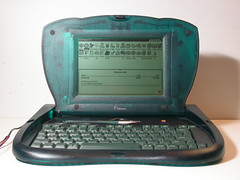
The more I play with them, the more impressed I am with the old eMates a colleague rescued for us. Their main application suite includes a word processor, a spreadsheet and a drawing program, all of which are intuitive and responsive. The eMates came loaded with an interactive tour and a training program to get you up to speed with the applications. Within 15 minutes my students were enthralled. Within 30 minutes, not only were they feeling comfortable with the machines, they were using them to write their next blog posts.
Their rugged clamshell design includes a sturdy handle so carrying them around the classroom was easy. The screens even have a backlight button which meant the pairs of students could lay on the ground under their desks-- for some reason this was a popular seating choice during this activity. I suspect it felt a bit like being in a cave or a tent with a flashlight on.
Despite charging, about half of the eMates needed to be plugged in to work. The others are still capable of retaining a battery charge. That amazes me. My classroom only has 3 outlets since 1.5 of the walls are movable. We have to charge the eMates in shifts. Fortunately, they have charging indicator lights on the top that change from orange to green when they are charged. That makes it easy for a child to monitor them and swap the plug to a different machine to get them all charged.
We tried out the eMates last fall and then haven't touched them again because of the fatal hinge problem that causes dried out old hinges to uncoil and poke through the thin cable the carries the video signal and the digitizing signals inside the computer. (The eMates have touch screens, hence the digitizing signal.) When we tested them last fall, only one showed signs of this type of damage, so I was hoping to hire my father to fix all the hinges. This is an involved process so it is slow going. I finally decided that we just needed to start using them. Our compromise is that now that we have opened them, we are not shutting them again. We figure if we don't move the hinge, no further damage will occur before we can get them fixed.
My jobs this weekend include...
Their rugged clamshell design includes a sturdy handle so carrying them around the classroom was easy. The screens even have a backlight button which meant the pairs of students could lay on the ground under their desks-- for some reason this was a popular seating choice during this activity. I suspect it felt a bit like being in a cave or a tent with a flashlight on.
Despite charging, about half of the eMates needed to be plugged in to work. The others are still capable of retaining a battery charge. That amazes me. My classroom only has 3 outlets since 1.5 of the walls are movable. We have to charge the eMates in shifts. Fortunately, they have charging indicator lights on the top that change from orange to green when they are charged. That makes it easy for a child to monitor them and swap the plug to a different machine to get them all charged.
We tried out the eMates last fall and then haven't touched them again because of the fatal hinge problem that causes dried out old hinges to uncoil and poke through the thin cable the carries the video signal and the digitizing signals inside the computer. (The eMates have touch screens, hence the digitizing signal.) When we tested them last fall, only one showed signs of this type of damage, so I was hoping to hire my father to fix all the hinges. This is an involved process so it is slow going. I finally decided that we just needed to start using them. Our compromise is that now that we have opened them, we are not shutting them again. We figure if we don't move the hinge, no further damage will occur before we can get them fixed.
My jobs this weekend include...
- Buying strip outlets that accommodate the eMates' large power plugs-- a conventional 6 outlet strip can only accommodate two eMate plugs.
- Figuring out how to dock them with one of the Macs in my classroom.
- Finding a serial to USB cable that will allow us to print to the Epson printer that was donated to our class.
- Rewrite my lesson plans for the week to make use of these great machines.
Wednesday, March 08, 2006
coComment!
One of my frustrations with blog comments is that when I leave them, I forget to go back and follow the conversation. That has made me hesitant to ask questions in the comments sections of blogs. Fortunately, that is all changing thanks to coComment!
Here's how it works...
I was so inspired by the potential of coComment that I did a bunch of blog commenting over the weekend, asking questions to my heart's content. It felt good to be conversing again.
Here's how it works...
- Go to their website.
- Set up a free account.
- Install their button on your favorites toolbar.
- Add your coComment feed to your RSS aggregator.
- Go leave comments in other people's blogs.
I was so inspired by the potential of coComment that I did a bunch of blog commenting over the weekend, asking questions to my heart's content. It felt good to be conversing again.
Saturday, February 25, 2006
Sharing the Things They Care About
I am just starting individual blogs with this year's group of fifth graders. I have been wondering how to set up my curriculum so that my students are reading and responding to blogs outside of our community. I may have hit upon a bit of a plan. As I introduced the blogs, I told them that part of the power of having their own blog was that it could help them share the things they care about, and it could connect them with other people with the same interests.
They got it. As they began their first posts, words poured from their fingers. Students who seemed to struggle with writer's block in other situations were writing amazingly well crafted first drafts on topics such as video games and golden retrievers. Maybe my next step is to help them set up Bloglines accounts, as Clarence has done, and help them learn to find those other blogs of interest.
My fear is that they will find and aggregate inappropriate feeds. I agree that fear-based decision-making isn't a place I like to go, but I also don't want to sabotage this first blogging venture in my school, possibly my district, by taking on too much too soon. For now, I'll just take the first step; I'll check in the blogging permission forms, and start pushing my administrator publish button in our Classblogmeister account.
They got it. As they began their first posts, words poured from their fingers. Students who seemed to struggle with writer's block in other situations were writing amazingly well crafted first drafts on topics such as video games and golden retrievers. Maybe my next step is to help them set up Bloglines accounts, as Clarence has done, and help them learn to find those other blogs of interest.
My fear is that they will find and aggregate inappropriate feeds. I agree that fear-based decision-making isn't a place I like to go, but I also don't want to sabotage this first blogging venture in my school, possibly my district, by taking on too much too soon. For now, I'll just take the first step; I'll check in the blogging permission forms, and start pushing my administrator publish button in our Classblogmeister account.
Wednesday, February 15, 2006
The Evolution of an Essay
Essays and fifth graders are not a natural combination. Unlike most of the forms of writing in the fifth grade curriculum, children have no experience with essays. No one sits their preschooler on their knee and reads them essays. No one is making picture books or children's movies of essays. In short, I'm asking them to write something for which they have no internal schema.
Earlier this year we made a few quick jabs at essays. In truth, they were more opinion pieces rather than essays. They were written in response to questions from the local newspaper, such as "What do you fear?" and "Who has it harder in life, children or adults?" A few of the more advanced writers understood what I mean by introduction, body and conclusion and made good beginner's efforts at including them. Most kids just wrote a few sentences.
After our environmental trip, I assigned them to write a real essay. I took them through all sorts of prewriting to generate ideas of what they learned on the trip. We did mapping exercises to discover ways to organize their ideas. We practiced writing introductions.
After all of that, we went to the lab and they wrote. What they wrote bore no resemblance to an essay. The first ones "done" wrote one informal paragraph with no apparent organization. The ones who took longer to finish wrote lovely travelogues that began when we boarded the bus and went straight through until they got off the bus back as school four days later.
I wasn't surprised to see that we had no essays. In the past I would have tried to conference with my students. However, as I've mentioned before, that hasn't worked well for me. The conferences rarely lead to real change, and the students who aren't in the conference at that moment are difficult to keep on task.
This time, I had them upload their essays into an assignment module in Moodle. I added a copy of the assignment rubric as a resource. As the projects came in, I was able to score them against the rubric, and then leave the children comments.
Before the class logged in to Moodle the next day, I discussed the difference between a travelogue and an essay. I assured them that we would keep their travelogues. They were worthwhile and a good way to remember the trip. The advantage of word processing was that we could save a copy of their travelogue and turn that into an essay without having to start again from scratch. We also revisited the rubric which to make more sense to them now that they had their writing in front of them. Students gamely logged in, read their comments and went about revising their work.
When I logged in that evening, I was amazed. The students were truly transforming their pieces into essays. They had introductions that introduced the topic and their main ideas. Each main idea had it's own paragraph with supporting details. Some students had even written a semblance of a conclusion. These are recapping conclusions, rather than "draw it all together and then make a further point" conclusions. But at this stage in the game, I'll take any conclusion I can get.
Of course not every student was at this point, but the majority of them were. This is much better success than I've ever had with face to face conferences. I'm not sure why this has been so successful. Is it that they can reread the comments? Maybe, but I'll wager that it is the combination of comments with an easy way to revise their writing without having to write it all by hand, again.
None of this is rocket science. I've seen for years that word processing generally makes fifth graders more willing to revise. But this Moodle conferencing has taken it all to a new level.
I'm excited for our next assignment; I'll set it up as a workshop instead of an assignment. Students will receive two other students' assignments to score and an attempt to score their own assignment. I'm hoping that evaluating other people's writing will be educational for them. This entire process is proving highly educational for me.
Earlier this year we made a few quick jabs at essays. In truth, they were more opinion pieces rather than essays. They were written in response to questions from the local newspaper, such as "What do you fear?" and "Who has it harder in life, children or adults?" A few of the more advanced writers understood what I mean by introduction, body and conclusion and made good beginner's efforts at including them. Most kids just wrote a few sentences.
After our environmental trip, I assigned them to write a real essay. I took them through all sorts of prewriting to generate ideas of what they learned on the trip. We did mapping exercises to discover ways to organize their ideas. We practiced writing introductions.
After all of that, we went to the lab and they wrote. What they wrote bore no resemblance to an essay. The first ones "done" wrote one informal paragraph with no apparent organization. The ones who took longer to finish wrote lovely travelogues that began when we boarded the bus and went straight through until they got off the bus back as school four days later.
I wasn't surprised to see that we had no essays. In the past I would have tried to conference with my students. However, as I've mentioned before, that hasn't worked well for me. The conferences rarely lead to real change, and the students who aren't in the conference at that moment are difficult to keep on task.
This time, I had them upload their essays into an assignment module in Moodle. I added a copy of the assignment rubric as a resource. As the projects came in, I was able to score them against the rubric, and then leave the children comments.
Before the class logged in to Moodle the next day, I discussed the difference between a travelogue and an essay. I assured them that we would keep their travelogues. They were worthwhile and a good way to remember the trip. The advantage of word processing was that we could save a copy of their travelogue and turn that into an essay without having to start again from scratch. We also revisited the rubric which to make more sense to them now that they had their writing in front of them. Students gamely logged in, read their comments and went about revising their work.
When I logged in that evening, I was amazed. The students were truly transforming their pieces into essays. They had introductions that introduced the topic and their main ideas. Each main idea had it's own paragraph with supporting details. Some students had even written a semblance of a conclusion. These are recapping conclusions, rather than "draw it all together and then make a further point" conclusions. But at this stage in the game, I'll take any conclusion I can get.
Of course not every student was at this point, but the majority of them were. This is much better success than I've ever had with face to face conferences. I'm not sure why this has been so successful. Is it that they can reread the comments? Maybe, but I'll wager that it is the combination of comments with an easy way to revise their writing without having to write it all by hand, again.
None of this is rocket science. I've seen for years that word processing generally makes fifth graders more willing to revise. But this Moodle conferencing has taken it all to a new level.
I'm excited for our next assignment; I'll set it up as a workshop instead of an assignment. Students will receive two other students' assignments to score and an attempt to score their own assignment. I'm hoping that evaluating other people's writing will be educational for them. This entire process is proving highly educational for me.
Moodle Evangelizing
I was writing a letter to a dear friend and former colleague. I was blathering on about...
Imagine my delight when she wrote back very excited about Moodle and appreciative that I'd gone into so much detail because now she is getting ideas on how to implement it at her school -- I feel like a grandparent who just discovered someone who actually enjoys looking at pictures of my grandchildren.
- what I've been doing with the Moodle
- how it is helping me get a handle on my overwhelming paperwork
- how the children are appreciating the immediate feedback on quizzes
- how my students who hate to read and write don't seem to realize they are doing both when they take part in the chats and the forums
- how kids are logging in from home to journal with me
- how the journals are helping me forge connections with children who now seem to see me as an ally instead of just another person getting in their way
- how the ability for me to leave comments on their assignments is leading many children to improve their writing through revision
- how I look forward to logging into the Moodle-- a feeling I don't get when staring at a pile of worksheets
Imagine my delight when she wrote back very excited about Moodle and appreciative that I'd gone into so much detail because now she is getting ideas on how to implement it at her school -- I feel like a grandparent who just discovered someone who actually enjoys looking at pictures of my grandchildren.
Sunday, January 29, 2006
Workshops or Assignments
I've been exploring Moodle's workshop module. For now, I learned it is too complicated for me to use with my current essay assignments. I really love the idea that students would be scoring and commenting on their own and two other students' essays based on the rubric I gave them. Unfortunately, I had trouble getting it working and in the interest of time, I switched it to an assignment. Now I see that for this point in our Moodle experience, that was wise. It is the next step up in terms of complexity. I think after students understand how to upload files and better understand scoring writing projects with a rubric, then we will be ready for a real online workshop.
Even just doing this as an assignment, I'm loving the interactions that Moodle allows. When I try to conference personally with 26 kids, it doesn't work. The other students are not focused enough to be gainfully employed while I conference, and the face to face conference isn't giving me all the impact that I want. Students generally enjoy the feedback, but it doesn't often lead to improvements in their writing.
With the assignment module, I am able to leave students replies, either inline or separately. I am also able to give them a score that I can change later. This is good for students since they can refer to the comments as much as needed, and the comments don't get lost. It is good for me since I can write the replies outside of class, freeing me for lots of mini-classes during class time.
Even just doing this as an assignment, I'm loving the interactions that Moodle allows. When I try to conference personally with 26 kids, it doesn't work. The other students are not focused enough to be gainfully employed while I conference, and the face to face conference isn't giving me all the impact that I want. Students generally enjoy the feedback, but it doesn't often lead to improvements in their writing.
With the assignment module, I am able to leave students replies, either inline or separately. I am also able to give them a score that I can change later. This is good for students since they can refer to the comments as much as needed, and the comments don't get lost. It is good for me since I can write the replies outside of class, freeing me for lots of mini-classes during class time.
Moodle Grades
I've been a slow learner this week. Although I know about our browser woes, I started new discussions with students in their private forums that we are using as journals. I ended up with sad children who thought I hadn't written back to them because they couldn't see the second message since Internet Explorer mashes all of the links together. I finally figured out what was going on and happiness reigns once more.
I did my first grading in Moodle. Since I will be coordinating the environmental ed trip next year, I set up two forums. One is for students to tell me what was great about this year's trip; these are the things I shouldn't change. The second forum is for discussing ways to make the trip better.
My initial standards are quite low. If they successfully posted in both forums, and their post was at least remotely on topic, they earned full points. The grading itself was easy. In the forum set up, I designated how many points were possible and that I was the only one who could give grades. Now when I read a response, there is a drop down menu to let me select the score. The students don't see that option.
If I had allowed them to give grades as well, there are all sorts of interesting options. They could grade each other's comments in regards to relevance or with points. The Moodle can even do some fancy score balancing if numerous scores are given for one response.
For now we kept it simple. I scored the responses that were submitted. The next day, I showed the children how to access their grades primarily so they had an easy was to see if they had posted in both forums. They seemed to like checking their grades, especially since they were getting such good ones.
I don't keep my main gradebook online yet, but this lets me see the power in doing that. I think there is some sort of plug in that would allow me to post my Easy Grade Pro records online with parent passwords. I may look into that for next year, even though that really ups the pressure on me.
In any case, I once again had children pouring over each other's responses, and when their computers allowed them to do so, they left replies. This still enchants me since the children reading through all these responses are so often the ones who refuse to read during our silent reading time, and refuse to write on writing assignments. I hope they never figure out that these ARE reading and writing assignments.
I did my first grading in Moodle. Since I will be coordinating the environmental ed trip next year, I set up two forums. One is for students to tell me what was great about this year's trip; these are the things I shouldn't change. The second forum is for discussing ways to make the trip better.
My initial standards are quite low. If they successfully posted in both forums, and their post was at least remotely on topic, they earned full points. The grading itself was easy. In the forum set up, I designated how many points were possible and that I was the only one who could give grades. Now when I read a response, there is a drop down menu to let me select the score. The students don't see that option.
If I had allowed them to give grades as well, there are all sorts of interesting options. They could grade each other's comments in regards to relevance or with points. The Moodle can even do some fancy score balancing if numerous scores are given for one response.
For now we kept it simple. I scored the responses that were submitted. The next day, I showed the children how to access their grades primarily so they had an easy was to see if they had posted in both forums. They seemed to like checking their grades, especially since they were getting such good ones.
I don't keep my main gradebook online yet, but this lets me see the power in doing that. I think there is some sort of plug in that would allow me to post my Easy Grade Pro records online with parent passwords. I may look into that for next year, even though that really ups the pressure on me.
In any case, I once again had children pouring over each other's responses, and when their computers allowed them to do so, they left replies. This still enchants me since the children reading through all these responses are so often the ones who refuse to read during our silent reading time, and refuse to write on writing assignments. I hope they never figure out that these ARE reading and writing assignments.
Tuesday, January 24, 2006
Browser Blues
One step forward, two steps back...
Our step forward was that our wonderful technician put Netscape on the old computers in lab B while we were gone at camp last week. Those that are running Mac OS 9.2 are now working well in Moodle using Netscape.
The steps backward come on the oldest computers. Those running Mac OS 8.0 or 8.1 still aren't working well. If students try to post anything, they run into trouble in Netscape because the post button is missing. In Internet Explorer, the posting works fine, but they can't read anyone else's posts because all the post links are smack on top of each other, making it impossible to reach more than the first one or two posts.
Amazingly, the students are making it work. Despite the computers being really slow and them needing to toggle between browsers, they are managing to post and respond. They like Moodling enough to hang in there, ploughing through the difficulties.
I like that they are getting so comfortable with computers, with online environments, with troubleshooting. More importantly, I like that we are now hearing from everyone. When I post a forum question, everyone responds instead of just a few kids. On top of that, lots of the kids receive responses to their ideas. This is in great contrast to a typical fifth grade discussion in which a majority of the kids are so busy thinking about what they want to say next that they aren't listening to what anyone else is saying.
So maybe I need to revise what I said. Maybe it isn't one step forward and two back. Maybe with all this shuffling, side stepping and spinning around, we are getting somewhere. It's a strange dance, but it seems to suit us.
Our step forward was that our wonderful technician put Netscape on the old computers in lab B while we were gone at camp last week. Those that are running Mac OS 9.2 are now working well in Moodle using Netscape.
The steps backward come on the oldest computers. Those running Mac OS 8.0 or 8.1 still aren't working well. If students try to post anything, they run into trouble in Netscape because the post button is missing. In Internet Explorer, the posting works fine, but they can't read anyone else's posts because all the post links are smack on top of each other, making it impossible to reach more than the first one or two posts.
Amazingly, the students are making it work. Despite the computers being really slow and them needing to toggle between browsers, they are managing to post and respond. They like Moodling enough to hang in there, ploughing through the difficulties.
I like that they are getting so comfortable with computers, with online environments, with troubleshooting. More importantly, I like that we are now hearing from everyone. When I post a forum question, everyone responds instead of just a few kids. On top of that, lots of the kids receive responses to their ideas. This is in great contrast to a typical fifth grade discussion in which a majority of the kids are so busy thinking about what they want to say next that they aren't listening to what anyone else is saying.
So maybe I need to revise what I said. Maybe it isn't one step forward and two back. Maybe with all this shuffling, side stepping and spinning around, we are getting somewhere. It's a strange dance, but it seems to suit us.
Sunday, January 22, 2006
Which Wiki? or The Trouble Without Email
My friend and colleague John approached me for suggestions regarding an upcoming web project he plans to undertake with his class of fourth and fifth students. He was planning on having them create posters to share information about alternative energy at the end of their energy unit. He then wanted them to be able to easily share that information on the web so that families could see and possibly even respond to it. He was going to create web pages, as he has in the past, but wondered if blogs would better fit the task since families would be able to leave comments.
I pondered it and told him the answer was none of the above. He should use a wiki. I quickly showed him PBWiki and Wikispaces. He looked unconvinced; he's a busy guy and didn't really want to take the time to learn this new tool since he was wishing he'd started the projects LAST week.
I argued that since he was going to set up the entire web site as a template, the kids weren't gaining much in the way of skills. If they used a wiki instead, they would be part of the read/write web because they could do the work themselves and other people could leave them comments. As Clarence has found, they would probably go home and start creating wikis of their own.
To better convince him and to get up to speed for my own upcoming student projects, I decided to set up a How to Wiki wiki for him. I poked around with the various wiki hosting options to see which would best meet our needs. John and I have identified three key criteria for our wikis.
There is a wiki in Moodle, but from what I can tell, it is safely locked up inside the Moodle, so it fails to meet the first criteria.
PB Wiki meets the first two criteria. Wikis can be viewed by anyone, but we can restrict editing privileges to only those people who have our passcode. This would keep out spam bots, but would fail criteria #3.
Wikispaces meets all three criteria, but at a price. Each child receives a separate invite. Accepting the invitation makes them a member of Wikispaces and of our wiki. Since each child is a separate member, the wiki can track which user makes which changes.
It sounds perfect, but it is at this point, that I once again run up against the thorn that keeps jabbing me this year; we don't have student email addresses.
I could use a service such a Gaggle.net, but this will involve getting parent permission. Since we don't plan to use the addresses for correspondence, this sounds like a lot of hassle.
I could create them on my BlueHost account. I think my subscription allows me to create 2500 email accounts. This could be almost as safe as Gaggle.net accounts, since I could set them up in such a way that all messages must stay on the server. However, it will be tedious work to do this for 50 users.
I know that with my mail application on my computer, I can tell the program whether to leave messages on the server or to download them to my computer. I wonder if that can be over-ridden by settings on the actual mail server. If it can, then even if the students tried to use their email addresses, I could monitor them. This is important both because I don't want to give the world unlimited contact with my fifth graders. I also don't want to give my students unsupervised access to each other. Some of them are still at the nasty note writing stage. I don't want to give them another tool to use for that, since the tool isn't going to be in use for positive activities as well.
How does everyone else deal with this need for student email accounts when setting up Moodles, blogs, wikis and other shared online spaces? Please share with me how you have overcome this problem.
I pondered it and told him the answer was none of the above. He should use a wiki. I quickly showed him PBWiki and Wikispaces. He looked unconvinced; he's a busy guy and didn't really want to take the time to learn this new tool since he was wishing he'd started the projects LAST week.
I argued that since he was going to set up the entire web site as a template, the kids weren't gaining much in the way of skills. If they used a wiki instead, they would be part of the read/write web because they could do the work themselves and other people could leave them comments. As Clarence has found, they would probably go home and start creating wikis of their own.
To better convince him and to get up to speed for my own upcoming student projects, I decided to set up a How to Wiki wiki for him. I poked around with the various wiki hosting options to see which would best meet our needs. John and I have identified three key criteria for our wikis.
- They need to be readable by families and other schools.
- They need to be protected to some degree from spam, but still allow outsiders to leave comments.
- They need to track who makes what changes, so we can track malicious editing back to the person who did it.
There is a wiki in Moodle, but from what I can tell, it is safely locked up inside the Moodle, so it fails to meet the first criteria.
PB Wiki meets the first two criteria. Wikis can be viewed by anyone, but we can restrict editing privileges to only those people who have our passcode. This would keep out spam bots, but would fail criteria #3.
Wikispaces meets all three criteria, but at a price. Each child receives a separate invite. Accepting the invitation makes them a member of Wikispaces and of our wiki. Since each child is a separate member, the wiki can track which user makes which changes.
It sounds perfect, but it is at this point, that I once again run up against the thorn that keeps jabbing me this year; we don't have student email addresses.
I could use a service such a Gaggle.net, but this will involve getting parent permission. Since we don't plan to use the addresses for correspondence, this sounds like a lot of hassle.
I could create them on my BlueHost account. I think my subscription allows me to create 2500 email accounts. This could be almost as safe as Gaggle.net accounts, since I could set them up in such a way that all messages must stay on the server. However, it will be tedious work to do this for 50 users.
I know that with my mail application on my computer, I can tell the program whether to leave messages on the server or to download them to my computer. I wonder if that can be over-ridden by settings on the actual mail server. If it can, then even if the students tried to use their email addresses, I could monitor them. This is important both because I don't want to give the world unlimited contact with my fifth graders. I also don't want to give my students unsupervised access to each other. Some of them are still at the nasty note writing stage. I don't want to give them another tool to use for that, since the tool isn't going to be in use for positive activities as well.
How does everyone else deal with this need for student email accounts when setting up Moodles, blogs, wikis and other shared online spaces? Please share with me how you have overcome this problem.
Friday, January 13, 2006
Motivation to Moodle
Lately I've been doing a bit of soul-searching about why I am battling to bring blogs, wikis, Moodle, and online calendars to my students. I can tell that some of the people I am annoying in my district think I'm inserting technology where none is needed.
Then I read this quote from Bud's blog...
That sums up one of the reasons I want to do this. Not only can I respond much more quickly when I can do it online, but the Moodle and the blog make it possible for others besides me to give them feedback. To that end, we posted our essays into Moodle and students have begun commenting on each other's work.
I am pleased with their comments. Most students responded to the content of the piece. A few even commented on the writing itself. Thus far, the comments seem more focused and useful than the student-led peer conferencing we have done. Those tend to leave the writing far behind as their conversation wanders off to football, video games, and who likes who.
Then I read this quote from Bud's blog...
One of the most frustrating parts of teaching and assigning writing is that I can't read, digest, and respond to everything that I ask my students to do in as timely a manner as I would like. By the time I get to some papers, students have moved on to other thoughts, ideas, and assignments, and the opportunity that might have existed to push a particular student's thinking in a new direction has moved on.
That sums up one of the reasons I want to do this. Not only can I respond much more quickly when I can do it online, but the Moodle and the blog make it possible for others besides me to give them feedback. To that end, we posted our essays into Moodle and students have begun commenting on each other's work.
I am pleased with their comments. Most students responded to the content of the piece. A few even commented on the writing itself. Thus far, the comments seem more focused and useful than the student-led peer conferencing we have done. Those tend to leave the writing far behind as their conversation wanders off to football, video games, and who likes who.
Failing the Moodle Quiz
All right, between getting ready for our upcoming environmental ed trip, and working such long hours to get the Moodle running while still teach all my courses, I've been only averaging a few hours of sleep per night all week. That is my only defense...
On Thursday we went into the creaky old lab to try taking the weekly spelling tests in Moodle. On one hand, using Moodle for spelling tests seem like a true waste of bandwidth. On the other hand, it takes me 30-40 minutes to give the spelling tests since there is more than one group and I must spell all the words aloud as we correct. Then I must recorrect them since quite a few of the children either don't really care, or, they care enough to be dishonest. In light of all of that, taking the weekly spelling test in Moodle seemed like a way to free up more of my time for more worthwhile things.
To that end, I used the quiz module to set up a spelling test for each group. I used the short answer portion of the module. I still have to dictate the words and they enter them in. However, when they finished the test, they could instantly see their results, which according to brain research, is key for making the test a learning experience.
Of course, there are not enough working computers in the old lab for all the children to take the quiz at the same time, so I had one group go first. At first the children had a bit of trouble with the interface until one discovered they could tab to the next field rather than try to scroll using the slowly responsive arrow keys. Kids kept getting lost and we'd go back to to catch them up. At long last, that group finished and submitted their answers only to find that they had all received a score of 0/20 and they couldn't see their itemized results. Scrambling to salvage the situation, I told them to print, but of course, after the third child, the old printer ran out of toner. Admitting temporary defeat, I had the second group take their turns at the computers, and they all had the same scores as the previous group. I told them all not to worry. It was a problem of my creating and they would not be penalized for it.
That night I went into Moodle to figure out why it hadn't worked since it was working so perfectly the night before when I tested it. It was at that point I sheepishly discovered that the Moodle quiz had worked just fine. All the problems were my fault. For the first group I had entered the wrong words. For the second group, I had the correct words but I had them in the wrong order. I couldn't figure out why they couldn't see their itemized results-- it was working fine now. I made the appropriate changes and the next day we retested.
The newer lab was available and all went smoothly except that half the children received an error from the Moodle server saying it was too busy to let them in. This is strange since I've had them all in before, but no matter. We once again tested in two groups and all went smoothly except for the child in the second group who was still logged in as the first group. Oops.
Listening to the children talk, they seemed to like taking the test on the computer, even though a few made typos -- I find they make typos even when writing by hand (c: I'll use the informal survey module at some point to see how they feel about online spelling tests after they've had more experience.
On Thursday we went into the creaky old lab to try taking the weekly spelling tests in Moodle. On one hand, using Moodle for spelling tests seem like a true waste of bandwidth. On the other hand, it takes me 30-40 minutes to give the spelling tests since there is more than one group and I must spell all the words aloud as we correct. Then I must recorrect them since quite a few of the children either don't really care, or, they care enough to be dishonest. In light of all of that, taking the weekly spelling test in Moodle seemed like a way to free up more of my time for more worthwhile things.
To that end, I used the quiz module to set up a spelling test for each group. I used the short answer portion of the module. I still have to dictate the words and they enter them in. However, when they finished the test, they could instantly see their results, which according to brain research, is key for making the test a learning experience.
Of course, there are not enough working computers in the old lab for all the children to take the quiz at the same time, so I had one group go first. At first the children had a bit of trouble with the interface until one discovered they could tab to the next field rather than try to scroll using the slowly responsive arrow keys. Kids kept getting lost and we'd go back to to catch them up. At long last, that group finished and submitted their answers only to find that they had all received a score of 0/20 and they couldn't see their itemized results. Scrambling to salvage the situation, I told them to print, but of course, after the third child, the old printer ran out of toner. Admitting temporary defeat, I had the second group take their turns at the computers, and they all had the same scores as the previous group. I told them all not to worry. It was a problem of my creating and they would not be penalized for it.
That night I went into Moodle to figure out why it hadn't worked since it was working so perfectly the night before when I tested it. It was at that point I sheepishly discovered that the Moodle quiz had worked just fine. All the problems were my fault. For the first group I had entered the wrong words. For the second group, I had the correct words but I had them in the wrong order. I couldn't figure out why they couldn't see their itemized results-- it was working fine now. I made the appropriate changes and the next day we retested.
The newer lab was available and all went smoothly except that half the children received an error from the Moodle server saying it was too busy to let them in. This is strange since I've had them all in before, but no matter. We once again tested in two groups and all went smoothly except for the child in the second group who was still logged in as the first group. Oops.
Listening to the children talk, they seemed to like taking the test on the computer, even though a few made typos -- I find they make typos even when writing by hand (c: I'll use the informal survey module at some point to see how they feel about online spelling tests after they've had more experience.
Thursday, January 12, 2006
Mucking Around with Moodle Settings
Instead of being a dutiful teacher and getting caught up in my correcting last night. I added the rest of our students to the Moodle. I had some trouble getting the csv file to upload, but it worked eventually.
Next I spent time playing around with the themes. My thought was to see which themes made it easiest for the students to locate information on the page. Some were definitely more legible than others. I finally settled on a different theme for each course so that the students and I could more easily keep track of them. And then I clicked something that reset all of them to the same theme. Such is life.
Finally, I experimented further with the quiz module. I found I could export a quiz that I made into a text format. Then I could easily make changes to it and upload it again as a new quiz. Much less tedious than entering them each question individually.
We'll try out the new quizzes tomorrow when we take our weekly spelling tests. I truly hate spelling tests; even using the developmental programs, I don't feel that we get enough out of them to warrant the time they take. If Moodle can shorten the time we spend administering and scoring the tests, then it will be yet another Good Thing.
Next I spent time playing around with the themes. My thought was to see which themes made it easiest for the students to locate information on the page. Some were definitely more legible than others. I finally settled on a different theme for each course so that the students and I could more easily keep track of them. And then I clicked something that reset all of them to the same theme. Such is life.
Finally, I experimented further with the quiz module. I found I could export a quiz that I made into a text format. Then I could easily make changes to it and upload it again as a new quiz. Much less tedious than entering them each question individually.
We'll try out the new quizzes tomorrow when we take our weekly spelling tests. I truly hate spelling tests; even using the developmental programs, I don't feel that we get enough out of them to warrant the time they take. If Moodle can shorten the time we spend administering and scoring the tests, then it will be yet another Good Thing.
Wednesday, January 11, 2006
First Lessons Learned in Moodle
Day one of Moodling was a success. I assigned my students the following tasks:
- Log in
- Go into the Journal course so you can write back to me in your journal
- Go into the Science course and take the quiz
- Go into the forum and tell us what you are looking forward to doing on our environmental ed trip next week.
- If you have time, go into the chat room and chat with your classmates
- You can moodle in Mac OS 8.x. However, the screens don't render correctly. This isn't insurmountable once you know where to look for things, but it is a bother. The biggest rendering problem we've encountered thus far is that in the journaling forum, the header above the topics is completely jumbled and covering the link to the topics themselves so you have to wave the mouse around until the cursor turns into a hand, otherwise you can't find the link.
- In OS 8.1 the chat feature works. In OS 8.0, the browser keeps trying to take us to the plug in download page, but not finding what it wants. I suspect it needs Flash which isn't compatible with 8.0.
- I didn't give clear enough directions regarding the journaling, so some students started new topics rather than replying to the message I had written to them.
- In the quiz module, I watched some students take the quiz, but nothing was recorded for them in the grade book. Possibly they aren't submitting their answers.
- In the forum, if they reply to someone else's response rather than hitting the reply link on the original topic, they are not given credit for responding in the grade book.
- As the teacher, you can read ALL the comments made in the chat room, even after the event. Although I had laid down guidelines about the chatroom's use, a few students went over to the dark side. They will be surprised when they discover that even though I was busy helping students while they chatted, I still know what they said.
- All of the students really seemed to enjoy the journaling. Most of them do not spend time online at home and don't have their own email, so this is a novel experience for them.
- The students greatly enjoyed chatting. One of my struggling readers who rarely reads voluntarily, read the chat messages as they appeared for twenty minutes. He only managed a few comments; I suspect the chat was streaming by too quickly for him to keep up. However, anything that gets this child to want to read has great merit in my book.
Monday, January 09, 2006
Moodling Around
My Moodle is finally ready to use. I decided to get my feet wet by having student journals in Moodle. In years gone by, one way I would get to know my students while also getting them to write was to journal with them. They each had a notebook and we'd write back and forth. It worked really well except that I had to lug around a class set of journals each night and then write in them by hand. Being able to type my responses motivated me enough to get going on this project.
I'd installed the Moodle software a few months ago on my web space. It had been quite easy since my web provider has Fantastico which did most of the work for me. After installing it, I'd gotten bogged down at the thought of creating an email account for each of my students. Our district does not provide them. I have the ability to create thousands of addresses as part of account with BlueHost.com, but I REALLY didn't want to go through all that work since we weren't going to use the address-- the program just insisted that they have addresses.
Fortunately, I decided to see how smart the software was. I gave all the students my Gmail address and it worked. The program now realizes that more than one user has the same address and it has grumbled at bit about that, but the user accounts are working just fine.
To set up my journaling Moodle, I first needed to import my student data. I already have an Excel spreadsheet containing class data. I was able to duplicate and revise it to fit my needs. Once I saved it as a comma-separated text file with the extension .cvs it imported cleanly. The biggest problem I had with this step was that I couldn't figure out where I needed to be to import the data. I finally figured out that I needed to not be logged into any particular course. There is an administration link in the first window that allowed me to upload the data.
I wanted these journals to be private, meaning that no child can read any other child's journal. To set up that level of privacy, I gave each child a unique password and username, and then I made each child there own separate group. Then I created a forum and started creating one discussion per child. Luckily I decided to test if this was working correcting. It wasn't. The children could see and read all of the messages. After lots of muttering and referring to the manual, I tried forcing the groups which is a command in the settings pane. That did the trick. This is an extreme setting, since part of the power of Moodle is collaboration. However, I have plenty of plans for other courses that will have them collaborate.
One unknown at this point is browser and OS compatibility. In our old computer lab at school, some of the machines are still running Mac OS 8.0 which means they can't run Flash. No where on the Moodle web site could I find any minimum browser requirements, so here's hoping it works. There's a chance it won't even work in the newer lab which is running 9.2. We can't view the parent blog there because Blogger doesn't play well with Internet Explorer 5. It makes the words display as one letter per line -- that makes for a really long web page.
I'd installed the Moodle software a few months ago on my web space. It had been quite easy since my web provider has Fantastico which did most of the work for me. After installing it, I'd gotten bogged down at the thought of creating an email account for each of my students. Our district does not provide them. I have the ability to create thousands of addresses as part of account with BlueHost.com, but I REALLY didn't want to go through all that work since we weren't going to use the address-- the program just insisted that they have addresses.
Fortunately, I decided to see how smart the software was. I gave all the students my Gmail address and it worked. The program now realizes that more than one user has the same address and it has grumbled at bit about that, but the user accounts are working just fine.
To set up my journaling Moodle, I first needed to import my student data. I already have an Excel spreadsheet containing class data. I was able to duplicate and revise it to fit my needs. Once I saved it as a comma-separated text file with the extension .cvs it imported cleanly. The biggest problem I had with this step was that I couldn't figure out where I needed to be to import the data. I finally figured out that I needed to not be logged into any particular course. There is an administration link in the first window that allowed me to upload the data.
I wanted these journals to be private, meaning that no child can read any other child's journal. To set up that level of privacy, I gave each child a unique password and username, and then I made each child there own separate group. Then I created a forum and started creating one discussion per child. Luckily I decided to test if this was working correcting. It wasn't. The children could see and read all of the messages. After lots of muttering and referring to the manual, I tried forcing the groups which is a command in the settings pane. That did the trick. This is an extreme setting, since part of the power of Moodle is collaboration. However, I have plenty of plans for other courses that will have them collaborate.
One unknown at this point is browser and OS compatibility. In our old computer lab at school, some of the machines are still running Mac OS 8.0 which means they can't run Flash. No where on the Moodle web site could I find any minimum browser requirements, so here's hoping it works. There's a chance it won't even work in the newer lab which is running 9.2. We can't view the parent blog there because Blogger doesn't play well with Internet Explorer 5. It makes the words display as one letter per line -- that makes for a really long web page.
Thursday, December 22, 2005
Little Bits of Blogging
Our student blog is underway! Pairs of students are taking turns writing a summary of our day and posting it on our class blogmeister blog.
We began last Thursday. We went into the computer lab and first we visited the Super Students Blog. It is an excellent 5th grade blog written by Ms. Sanborn's class at Willowdale Elementary. I wanted them to have good blogging role models. I don't know that in one visit my students absorbed those writers' effective strategies, but they were envious that Ms. Sanborn's class was working on a robotics unit.
Next I introduced Blogmeister. The class voted on which Blogmeister template they wanted for our blog. They chose the rainbow colored pattern with a peace sign logo. Next they helped me write the first entry. It was a bit tortuous writing it as a group, but they did help me revise it as we read back through it.
I explained to the class that we were writing for two different audiences. One audience was their classmates. If someone was absent, they could visit the blog to see what they had missed. The other audience was their parents. As I explained it to them...
Next we went back to the room and formed blogging teams. To my surprise, a number of students chose to be on a team of one, which means they will write alone on their day. To my delight, most of the children wanted to be the first to write to our blog.
Reading the first pairs' draft, I could clearly see that our first area of writing instruction needed to focus on fleshing out writing topics. Even Strunk and White would have to admit this writing was too lean. I had another student work with them to add more details.
The next day, students were approaching me on their own to ask permission to be the blog writer of the day. I hope that level of enthusiam continues.
Before our next session, I created a brainstorming template in Kidspiration, and another one in Appleworks. The children prefer the Kidspiration template, but I'm thinking it may be the most effective for the bloggers to receive a paper template that they carry with them the day they are in charge of writing the blog. They can add to it throughout the day. I'm envisioning a special blogger clipboard they could carry from class to class so that all their teachers would know they had permission to be taking notes.
It was a crazy time of year to tackle something new. We have class through Friday and the children are already giddy with Christmas excitement. However, it is proving a worthy distraction. And it was a gift to me to be blogging with children again.
We began last Thursday. We went into the computer lab and first we visited the Super Students Blog. It is an excellent 5th grade blog written by Ms. Sanborn's class at Willowdale Elementary. I wanted them to have good blogging role models. I don't know that in one visit my students absorbed those writers' effective strategies, but they were envious that Ms. Sanborn's class was working on a robotics unit.
Next I introduced Blogmeister. The class voted on which Blogmeister template they wanted for our blog. They chose the rainbow colored pattern with a peace sign logo. Next they helped me write the first entry. It was a bit tortuous writing it as a group, but they did help me revise it as we read back through it.
I explained to the class that we were writing for two different audiences. One audience was their classmates. If someone was absent, they could visit the blog to see what they had missed. The other audience was their parents. As I explained it to them...
None of you would ever do this, but SOME children go home and when asked by their parents what they did at school that day, they reply, "Nothing."They clearly related to THAT experience.
Next we went back to the room and formed blogging teams. To my surprise, a number of students chose to be on a team of one, which means they will write alone on their day. To my delight, most of the children wanted to be the first to write to our blog.
Reading the first pairs' draft, I could clearly see that our first area of writing instruction needed to focus on fleshing out writing topics. Even Strunk and White would have to admit this writing was too lean. I had another student work with them to add more details.
The next day, students were approaching me on their own to ask permission to be the blog writer of the day. I hope that level of enthusiam continues.
Before our next session, I created a brainstorming template in Kidspiration, and another one in Appleworks. The children prefer the Kidspiration template, but I'm thinking it may be the most effective for the bloggers to receive a paper template that they carry with them the day they are in charge of writing the blog. They can add to it throughout the day. I'm envisioning a special blogger clipboard they could carry from class to class so that all their teachers would know they had permission to be taking notes.
It was a crazy time of year to tackle something new. We have class through Friday and the children are already giddy with Christmas excitement. However, it is proving a worthy distraction. And it was a gift to me to be blogging with children again.
Wednesday, December 14, 2005
My ID...
When I first created this blog, I wasn't sure if I could include personal information that would identify my school because I wasn't sure how the student blogs would interact with it. To protect their personal information, I didn't share mine. I was also a bit leery of giving away personal information in the blogosphere; I hadn't any real feel for the potential consequences, so I erred on the side of caution.
Eventually it became clear that the student blogs would not be linked to this blog, so I turned on my profile, because bloggers I respected kept writing about how important it was to not be anonymous.
Then about a month ago I started another Blogger blog. It is an online newsletter for the parents of our students. It represents our entire grade level, not just me, so I didn't want my profile on the page-- that made it look like it was just mine. Unfortunately, the Blogger settings seemed to be an all-or-nothing type of thing in regards to profiles.
Finally, I poked around enough inside the blog template to remark the profile out of the parent blog. I tried this before and ran into trouble. However, it seems to be working for the moment, so I'm glad to no longer be anonymous on this blog. Thank you to Doug Johnson over at at The Blue Skunk Blog for nudging me into it.
Eventually it became clear that the student blogs would not be linked to this blog, so I turned on my profile, because bloggers I respected kept writing about how important it was to not be anonymous.
Then about a month ago I started another Blogger blog. It is an online newsletter for the parents of our students. It represents our entire grade level, not just me, so I didn't want my profile on the page-- that made it look like it was just mine. Unfortunately, the Blogger settings seemed to be an all-or-nothing type of thing in regards to profiles.
Finally, I poked around enough inside the blog template to remark the profile out of the parent blog. I tried this before and ran into trouble. However, it seems to be working for the moment, so I'm glad to no longer be anonymous on this blog. Thank you to Doug Johnson over at at The Blue Skunk Blog for nudging me into it.
Sunday, November 27, 2005
Back to Blogging with Kids--Almost!
After all my deliberating about how to get student blogs approved, I may have come in through the back door.
The families of the students I teach are wanting more communication from school and are frustrated that some of their children are not yet using their plan books to write down all their assignments. To remedy these problems, I created assignment calendars in iCal and published them using my .Mac account. Then I created a team blog here in Blogger and made sidebar links to the calendars.
I introduced the blog and the calendars at our parent-teacher conferences last week. At that time, I mentioned to the families of my communications class, that we will start student blogs this fall. I explained the safeguards available in Blogmeister and our own blogging privacy policy. Families seemed interested and none seemed stressed at this point. However, I was not able to meet with all the families of the students in my communications class since we conference with our homerooms.
Thus far I've posted team news on the blog, but hopefully I'll be able to start having students first help me write and then take over writing a summary of our day. It feels good to be blogging on the job again.
The families of the students I teach are wanting more communication from school and are frustrated that some of their children are not yet using their plan books to write down all their assignments. To remedy these problems, I created assignment calendars in iCal and published them using my .Mac account. Then I created a team blog here in Blogger and made sidebar links to the calendars.
I introduced the blog and the calendars at our parent-teacher conferences last week. At that time, I mentioned to the families of my communications class, that we will start student blogs this fall. I explained the safeguards available in Blogmeister and our own blogging privacy policy. Families seemed interested and none seemed stressed at this point. However, I was not able to meet with all the families of the students in my communications class since we conference with our homerooms.
Thus far I've posted team news on the blog, but hopefully I'll be able to start having students first help me write and then take over writing a summary of our day. It feels good to be blogging on the job again.
Sunday, November 20, 2005
Another Blog that Keeps Stretching Me
Today John Pederson challenges us to share a blogger we are reading who is challenging our thinking and worthy of a little more attention from the blogosphere.
One of my entries in this category is blog of proximal development. I don't hear it mentioned often, but it usually gives me good food for thought. The current post, Nit-Picking Criticism, focuses on the factors affecting students' reviews of each others' writing. It struck a real chord with me. He draws on the writings of Donald Graves to inform his practice and then extends it based on his own experience.
Give it a look.
One of my entries in this category is blog of proximal development. I don't hear it mentioned often, but it usually gives me good food for thought. The current post, Nit-Picking Criticism, focuses on the factors affecting students' reviews of each others' writing. It struck a real chord with me. He draws on the writings of Donald Graves to inform his practice and then extends it based on his own experience.
Give it a look.
Wednesday, November 09, 2005
The Joys of Percolating
At long last, I am once again full of ideas.
Not well-organized ideas, but ideas.
I have been home sick for the past day and a half. Not deathly ill, just too feverish to manage fifth grade students. It's been the first time I've had in months to just putter on my computer. I tended to all sorts of online loose ends. As I tidied, I had time to follow a few thoughts. One thing lead to another and BANG! Suddenly I was full of possibilities.
I began to see how to get my writing program in gear. I have a few good resources I'll use to keep me from creating everything from scratch. Some of those resources have good worksheets, but I'm the only one who sees worksheets. What if the responses were in some sort of forum where students could respond to each other's ideas, refine them, challenge them?
Hey wait! Doesn't Moodle have forums? Let's get Moodle going. But my students need email addresses to be part of Moodle and most of them don't have email addresses. But wait! I think I get thousands of free addresses with my web space. Can I create 50 accounts and use those to register my students in my Moodle? (brief pause) It works! And the students have no way of accessing those addresses so the addresses do not present a security problem in any way.
And couldn't these writing projects develop into Blogs? David Warlick has kindly sent me the info to register my class in BlogMeister. Can we start projects in Moodle and then move the polished ones to blogs for world consumption?
What about all the poetry we wrote earlier? Could we make a poetry wiki? It could have a section for each type of poetry, with accompanying pages of examples. Should each poem be its own page or should all the poems of one type be on the same page? Can we paste from Appleworks into a wiki or will hidden bits of code wreak havoc?
If only we had more access to the computers. If only we could quickly fix all the hinges on the eMates we received. Then we could use them...
And what about the email discussion group I manage? We've been having so much trouble making sure everyone has all of the addresses correct. During our current session, no one but me has received all of the responses because each person sending has a different person's email address wrong. We tried making the group a multi-user blog but this group isn't in a place for news readers and RSS feeds so it fell flat. We need something like a discussion forum or Yahoo groups, but something private and that is email-based, not web-based, something like a mailing list. A mailing list! I wonder if there is open source software to run a mailing list. Oh look! My web space has PHPlist that can be installed with Fantastico! And here's a PHPlist support forum so I can ask my newbie questions and rely on the kindness (and patience) of strangers to help me find my way. Now, how to migrate from email to mailing list without stressing my users... [Update: The kind forum users explained that PHPlist is only for sending mail, not receiving so it won't work. Fortunately, my web space host has Mailman mailing list software already configured.]
And so, I have quadrupled my to-do list but I feel energized by the possibilities and by my own new learning, instead of drained and overwhelmed as I've felt up until now. Now to carve out enough time to get these items rolling.
Not well-organized ideas, but ideas.
I have been home sick for the past day and a half. Not deathly ill, just too feverish to manage fifth grade students. It's been the first time I've had in months to just putter on my computer. I tended to all sorts of online loose ends. As I tidied, I had time to follow a few thoughts. One thing lead to another and BANG! Suddenly I was full of possibilities.
I began to see how to get my writing program in gear. I have a few good resources I'll use to keep me from creating everything from scratch. Some of those resources have good worksheets, but I'm the only one who sees worksheets. What if the responses were in some sort of forum where students could respond to each other's ideas, refine them, challenge them?
Hey wait! Doesn't Moodle have forums? Let's get Moodle going. But my students need email addresses to be part of Moodle and most of them don't have email addresses. But wait! I think I get thousands of free addresses with my web space. Can I create 50 accounts and use those to register my students in my Moodle? (brief pause) It works! And the students have no way of accessing those addresses so the addresses do not present a security problem in any way.
And couldn't these writing projects develop into Blogs? David Warlick has kindly sent me the info to register my class in BlogMeister. Can we start projects in Moodle and then move the polished ones to blogs for world consumption?
What about all the poetry we wrote earlier? Could we make a poetry wiki? It could have a section for each type of poetry, with accompanying pages of examples. Should each poem be its own page or should all the poems of one type be on the same page? Can we paste from Appleworks into a wiki or will hidden bits of code wreak havoc?
If only we had more access to the computers. If only we could quickly fix all the hinges on the eMates we received. Then we could use them...
And what about the email discussion group I manage? We've been having so much trouble making sure everyone has all of the addresses correct. During our current session, no one but me has received all of the responses because each person sending has a different person's email address wrong. We tried making the group a multi-user blog but this group isn't in a place for news readers and RSS feeds so it fell flat. We need something like a discussion forum or Yahoo groups, but something private and that is email-based, not web-based, something like a mailing list. A mailing list! I wonder if there is open source software to run a mailing list. Oh look! My web space has PHPlist that can be installed with Fantastico! And here's a PHPlist support forum so I can ask my newbie questions and rely on the kindness (and patience) of strangers to help me find my way. Now, how to migrate from email to mailing list without stressing my users... [Update: The kind forum users explained that PHPlist is only for sending mail, not receiving so it won't work. Fortunately, my web space host has Mailman mailing list software already configured.]
And so, I have quadrupled my to-do list but I feel energized by the possibilities and by my own new learning, instead of drained and overwhelmed as I've felt up until now. Now to carve out enough time to get these items rolling.
Saturday, November 05, 2005
Wiki News Update
I still haven't figured out how I will integrate wikis into my current curriculum. However, the tools I can use keep getting better.
I heard from David Weekly yesterday. He's the founder of the elegant PBWiki. He says that as of last night, "we have bumped up pbwiki users' upload space to 10MB for free users and 1000MB for Premium users. We have no limit on the size or number of wiki pages." That is great news. They also added new features, including easy tables, the ability to preview changes before making them, and the ability to see who made changes to the wiki.
That last feature is a key one for me. Over the years, I've seen too many collaborative student tech projects vandalized or even destroyed by one anonymous user. If the students understand from the start that we can see who has made changes, those students will most likely seek other outlets for their destructive tendencies. Or, they may just get hold of someone else's password and log in as them. Hopefully their low level of tech skills will work to our advantage in this area.
I also heard from Adam over at Wikispaces. He told me...
I heard from David Weekly yesterday. He's the founder of the elegant PBWiki. He says that as of last night, "we have bumped up pbwiki users' upload space to 10MB for free users and 1000MB for Premium users. We have no limit on the size or number of wiki pages." That is great news. They also added new features, including easy tables, the ability to preview changes before making them, and the ability to see who made changes to the wiki.
That last feature is a key one for me. Over the years, I've seen too many collaborative student tech projects vandalized or even destroyed by one anonymous user. If the students understand from the start that we can see who has made changes, those students will most likely seek other outlets for their destructive tendencies. Or, they may just get hold of someone else's password and log in as them. Hopefully their low level of tech skills will work to our advantage in this area.
I also heard from Adam over at Wikispaces. He told me...
We're free, we don't have any restrictions on the size of your spaces, the number of images you can upload, or the number of spaces you can have. We use creative commons licensing by default for public spaces, although you can change that if you like. We strive to be really easy to use for non-technical people. And we have a particular interest in wikis in education. We have a lot of teachers and students doing cool things on the site already.I was thinking of using the wiki module in Moodle. The fine folks at Moodle are in transition from their current wiki module to DFWiki which looks to be powerful and well integrated with the other Moodle modules. However, I'm not yet using Moodle with my students; I am still going through the set up process with that, so I think I'll use one of these two stand alone wiki options and let David and Adam deal with the tech side of things for me.
From Angst to Action
I am full of angst.
I am working full-out, but not even remotely teaching the way I want to be teaching.
Re-entry into US public school teaching has been jarring and disheartening.
Be it real or imagined, I feel a crushing pressure to teach to the test, teach what is familiar to the parents of my students, teach the Prescribed Curriculum, leave No Child Behind.
And so that is what I'm doing with worksheets and textbooks. And my students buy into it [or not] in varying degrees. And we are all playing school, except that this is their real lives, real childhoods.
At some level, they sense that what we are doing isn't relevant to their lives. If their families place a high priority on school, they get some satisfaction from playing school well. Some days I am able to make what we are doing fun, engaging. That doesn't hide that this is an old, disjointed, largely irrelevant curriculum.
But at night, I read edublogs. Today Clarence Fisher over at Remote Access discusses three vital pieces that need to be in place to restructure our classrooms so that they meet the future needs of our students. As usual, he clearly and succinctly draws the essentials into focus.
Articles like Clarence's depress me because my practice is so far from what those bloggers are doing in their classrooms. They also give me the kick I need to get moving. Tonight I sent and e-mail to David Warlick requesting a pass code for Blog Meister so that I can begin to blog with my students.
Even the elation of that small step is tempered by exhaustion. Where will I find the time and energy to get this up and running? How will I inform families, build support AND use the blogs to empower my students through their writing?
I used to sling around the unattributed quote,
I am working full-out, but not even remotely teaching the way I want to be teaching.
Re-entry into US public school teaching has been jarring and disheartening.
Be it real or imagined, I feel a crushing pressure to teach to the test, teach what is familiar to the parents of my students, teach the Prescribed Curriculum, leave No Child Behind.
And so that is what I'm doing with worksheets and textbooks. And my students buy into it [or not] in varying degrees. And we are all playing school, except that this is their real lives, real childhoods.
At some level, they sense that what we are doing isn't relevant to their lives. If their families place a high priority on school, they get some satisfaction from playing school well. Some days I am able to make what we are doing fun, engaging. That doesn't hide that this is an old, disjointed, largely irrelevant curriculum.
But at night, I read edublogs. Today Clarence Fisher over at Remote Access discusses three vital pieces that need to be in place to restructure our classrooms so that they meet the future needs of our students. As usual, he clearly and succinctly draws the essentials into focus.
Articles like Clarence's depress me because my practice is so far from what those bloggers are doing in their classrooms. They also give me the kick I need to get moving. Tonight I sent and e-mail to David Warlick requesting a pass code for Blog Meister so that I can begin to blog with my students.
Even the elation of that small step is tempered by exhaustion. Where will I find the time and energy to get this up and running? How will I inform families, build support AND use the blogs to empower my students through their writing?
I used to sling around the unattributed quote,
Anything worth doing, is worth doing poorly [rather than not at all].I wonder if I can take my own advice.
Sunday, October 30, 2005
Web 2.0 Clearly Explained
A few days ago I was stumbling around in my head, trying to get a handle Web 2.0. Then a friend sent me to the O'Reilly website to read Tim O'Reilly's article What is Web 2.0. Even if you are already familiar with the term, this easy to read article clearly lays out the paradigm shift inherent in moving from Web 1.0 to Web 2.0. Enjoy!
Friday, October 28, 2005
One More Person Who Thought Different
Quite a few years back, Apple Computer ran its "Think Different" campaign. I was fortunate enough to get posters of the campaign and they are still hanging in the classroom I taught in back them-- the current user refuses to give them back because they are such great posters.
The posters featured large, black and white photos of people who had thought differently from their contemporaries, such as Cesar Chavez, Picasso, Jim Henson, Einstein, and Amelia Earhart. In the corner of the poster was the Apple logo and the words "Think Different." Many times those posters served as segues to conversations about these people who changed the world through their unconventional thoughts and actions.
I am pleased to say that after all this time, Apple has returned to this format to include one more very important person. Even if you hate all things Mac, take the time to check it out on their home page. [Update: Apple moved it from their home page to here.]
The posters featured large, black and white photos of people who had thought differently from their contemporaries, such as Cesar Chavez, Picasso, Jim Henson, Einstein, and Amelia Earhart. In the corner of the poster was the Apple logo and the words "Think Different." Many times those posters served as segues to conversations about these people who changed the world through their unconventional thoughts and actions.
I am pleased to say that after all this time, Apple has returned to this format to include one more very important person. Even if you hate all things Mac, take the time to check it out on their home page. [Update: Apple moved it from their home page to here.]
Thursday, October 27, 2005
A Flickr of Wikis
I'm supposed to be contacting parents who haven't yet signed up for conferences.
I'm supposed to be looking over the pile of collected assignments.
I'm supposed to be repairing my dodgy gradebook.
But I'm not.
I was all ready to go to bed, too tired to dig into any of those projects. But first, I checked my Bloglines and read about that Alex Halavais' students are creating their own communications theory textbook. They are using a wiki as their collaborative space for this venture.
That got me thinking about the power of a learning community that is actively constructing knowledge. Which in turn lead me to my science lesson today. We are using the FOSS Landforms science kit. My students were crowded around stream tables for the second day. Yesterday they "discovered" erosion. Today, we added food coloring to the water source so they could more clearly see the water's movement through the earth materials. They observed lakes, rivers, waterfalls, flood plains, beaches and deltas being formed. They were entranced.
The concepts being taught here are more important than the terminology being introduced, but I'd love for them to acquire both. That lead me to visit Flickr. I found great photos of meander and plateau. It would be powerful for my class to make a wiki of landforms. But how to credit the sources? I explored the Creative Commons explanations page of the Flickr site, but I don't understand it. Is it possible to just search the Creative Commons photos? I didn't figure out a way to do that, but none of the photos I found had any of the Creative Commons marks besides them.
Next I went to Google Images and was immersed in visuals. How rich for my students to search for images of plateau. Scrolling through the search results is guaranteed to expand almost anyone's scheme of plateau. Just doing this will be helpful. How much more powerful if my students could use the most evocative of those images on a wiki page that explains that landform. But can I do it? If our wiki is just internal or only accessed by a password, can we use the images if we credit the photographer or the web page if the photographer isn't identified?
After that I looked at wiki's. I know Clarence Fisher is using PBWiki with his students. Free PBWiki's have a size limit of 1 MB. If we add photos, even photos scaled for the web, we will quickly exceed that limit. I have my own web space through BlueHost. I checked my control panel and found that I can easily install either TWiki or PhpWiki using Fantastico on my site. Poking around for reviews on the web, it looks like TWiki is going to be the easiest to use and the more aesthetically pleasing of the two. I'd love to hear from anyone who has experience with both-- should I go with PBWiki or try to run TWiki or Phpwiki on my own? I'd greatly value hearing from teachers with experience in this area.
And so, that's how it gets to be two hours later than when I started going to bed. I'm still awake. None of my work is done, and I really don't want to wake up early to do it. All I want to do is further explore these ideas.
I'm supposed to be looking over the pile of collected assignments.
I'm supposed to be repairing my dodgy gradebook.
But I'm not.
I was all ready to go to bed, too tired to dig into any of those projects. But first, I checked my Bloglines and read about that Alex Halavais' students are creating their own communications theory textbook. They are using a wiki as their collaborative space for this venture.
That got me thinking about the power of a learning community that is actively constructing knowledge. Which in turn lead me to my science lesson today. We are using the FOSS Landforms science kit. My students were crowded around stream tables for the second day. Yesterday they "discovered" erosion. Today, we added food coloring to the water source so they could more clearly see the water's movement through the earth materials. They observed lakes, rivers, waterfalls, flood plains, beaches and deltas being formed. They were entranced.
The concepts being taught here are more important than the terminology being introduced, but I'd love for them to acquire both. That lead me to visit Flickr. I found great photos of meander and plateau. It would be powerful for my class to make a wiki of landforms. But how to credit the sources? I explored the Creative Commons explanations page of the Flickr site, but I don't understand it. Is it possible to just search the Creative Commons photos? I didn't figure out a way to do that, but none of the photos I found had any of the Creative Commons marks besides them.
Next I went to Google Images and was immersed in visuals. How rich for my students to search for images of plateau. Scrolling through the search results is guaranteed to expand almost anyone's scheme of plateau. Just doing this will be helpful. How much more powerful if my students could use the most evocative of those images on a wiki page that explains that landform. But can I do it? If our wiki is just internal or only accessed by a password, can we use the images if we credit the photographer or the web page if the photographer isn't identified?
After that I looked at wiki's. I know Clarence Fisher is using PBWiki with his students. Free PBWiki's have a size limit of 1 MB. If we add photos, even photos scaled for the web, we will quickly exceed that limit. I have my own web space through BlueHost. I checked my control panel and found that I can easily install either TWiki or PhpWiki using Fantastico on my site. Poking around for reviews on the web, it looks like TWiki is going to be the easiest to use and the more aesthetically pleasing of the two. I'd love to hear from anyone who has experience with both-- should I go with PBWiki or try to run TWiki or Phpwiki on my own? I'd greatly value hearing from teachers with experience in this area.
And so, that's how it gets to be two hours later than when I started going to bed. I'm still awake. None of my work is done, and I really don't want to wake up early to do it. All I want to do is further explore these ideas.
Monday, October 24, 2005
eMates!
We have new toys. A colleague noticed that his building was dumping their eMate computers. WE contacted the district Tech Department and they said we could have them. They arrived last Monday. As luck would have it, 1/2 of my communications class was at a reading coach inservice for most of the period on Tuesday, so the rest of us dug in.
Overall, I am very impressed with this tool. They are rugged. They charge quickly and run for hours on a charge. They come with a wonderful tutorial and with a practice program to get the users quickly up to speed. They have a built in word processor, drawing program and spreadsheet. The children are very excited to use them. I hope I can leverage that into some good writing.
Another wonderful aspect is that one of my students is already making himself the eMate Expert. This will be an opportunity for him to shine, as other students come to rely on him for assistance. I was wishing for just such an opportunity for him.
Of course, I receive this windfall and I immediately want more, including...
Overall, I am very impressed with this tool. They are rugged. They charge quickly and run for hours on a charge. They come with a wonderful tutorial and with a practice program to get the users quickly up to speed. They have a built in word processor, drawing program and spreadsheet. The children are very excited to use them. I hope I can leverage that into some good writing.
Another wonderful aspect is that one of my students is already making himself the eMate Expert. This will be an opportunity for him to shine, as other students come to rely on him for assistance. I was wishing for just such an opportunity for him.
Of course, I receive this windfall and I immediately want more, including...
- one eMate per student instead of just ten eMates total
- an IR printer
- an IR dongle-- we can download using a serial cable, but my students would absolutely love beaming their writing through the air to another computer.
- The eMates can beam files to other eMates. I can see this being a very distracting activity as kids send messages back and forth. I need to figure out how to use this natural urge into a positive learning experience rather than something I try to control. (Any ideas, anyone?)
- I need to figure out how to assign the eMates to pairs of kids. I want to be able to be teaching mini-lessons to small groups while other groups are working on the eMates. The eMates are so easy to use, that this should work. However, I need to figure out which groups I have them in. Their spelling groups? Their as of yet uncreated reading groups? Behavior groups? I'll keep thinking about it.
- I need to figure out how to keep the eMates charged with only three over-used electrical outlets in the entire classroom. And of course, while they are charging, I'd prefer they not get walked on or otherwise broken.
- And speaking of broken, I just found out about a known defect in these nifty devices. The hinge spring bends and pokes a hole in the display cable, leading to all sorts of problems such as dead lines on the screen or the stylus no longer working. A number of kind people on the NewtonTalk discussion list sent me directions on how to head this problem off. It looks really complicated and time consuming. I feel intimidated now!
Saturday, October 22, 2005
Flocking to Flock
I've been having trouble getting my brain around Web 2.0. Today, two things happened to clarify it for me. First, this morning I was listening to an EdTechTalk.com podcast. Their guests were Stephen Downes and Will Richardson. As they discussed Web 2.0 I started to get the vision. It made me think about Steve Job's idea a few years ago of your Mac being "your digital hub". He was envisioning our Macs connected to the our cameras, our MP3 players, and such. To support that, came the iLife apps such as iPhoto, iMovie and iTunes.
Instead of being a hub for hardware, Web 2.0 is your digital hub for online life, such as your blogs, your feeds, your bookmarks and tags, your to-do lists, your photos. It will be the hub for not just your personal read/write web, but also your social one.
So then after listening to the podcast, what should I find in my e-mail box but notice that Flock is distributing a beta of it's Web 2.0 browser? They make no stability claims at this point, but take a moment to peruse this list of 13 things you can do with Flock. Amazing! I'm creating this post directly from it without even going to Blogger. It inspired me to finally get a del.iciou.us account. With Flock's help, I can see myself seamlessly integrating many aspects of my digital life.
Flock probably isn't stable enough yet to be a student browser, but it will be. I can hardly wait to see where Web 2.0 takes us.
Saturday, October 15, 2005
An iTunes Wish
Apple made a number of interesting announcements this week and now I'm longing for a new iMac. However, Apple didn't announce the iTunes feature I really wanted to see; I want iTunes to filter incoming podcasts into playlists and upload them that way to my iPod.
The problem I'm having is that some of the podcasts I regularly listen to are actually snippets of things from the Australian Broadcasting Corp, or the BBC or NPR. These segments are typically only 3-8 minutes long. When I'm listening to these shows on my iPod, I don't want to keep stopping every few minutes to select a new show, so I've been organizing them into playlists, such as News and Tech and Education. However, that makes for lots of management on my part and requires me to actually remember what I've listened to and what I haven't.
It seems like this feature shouldn't be too difficult to add. My NetNewsWire Lite is able to manage my podcast subscriptions, and those subscriptions can be organized into folders. I'll have to play with the preferences to see if that program is smart enough to upload them in folders to iTunes. If it isn't, I'm hoping Apple will add that feature soon. Do any of you know of a program that already does this? Any developers out there looking for a new project?
The problem I'm having is that some of the podcasts I regularly listen to are actually snippets of things from the Australian Broadcasting Corp, or the BBC or NPR. These segments are typically only 3-8 minutes long. When I'm listening to these shows on my iPod, I don't want to keep stopping every few minutes to select a new show, so I've been organizing them into playlists, such as News and Tech and Education. However, that makes for lots of management on my part and requires me to actually remember what I've listened to and what I haven't.
It seems like this feature shouldn't be too difficult to add. My NetNewsWire Lite is able to manage my podcast subscriptions, and those subscriptions can be organized into folders. I'll have to play with the preferences to see if that program is smart enough to upload them in folders to iTunes. If it isn't, I'm hoping Apple will add that feature soon. Do any of you know of a program that already does this? Any developers out there looking for a new project?
Monday, October 10, 2005
Domain Trickery
Finally sat down to get my Moodle working. It was at this point I realized that the hosting service I was signing up with didn't include a domain. I never dreamed I needed to purchase a domain on top of the hosting fees.
I guess my ignorance is based on prior experience. My .Mac account includes a domain. My educational ISP includes a domain. In my experience, the domain has always been provided. I didn't expect it to be the domain of my choosing; I assumed it would be like my .Mac one. That domain is clearly part of .Mac based on its address. Unfortunately, neither of these sites appear to have what I need for hosting Moodle, and my ISP, Comcast, doesn't provide space.
And so, before I even have my site up and running I have learned to check that the hosting fee includes a domain. I have also learned to check that the host has Fantastico so that Moodle and other good things can be installed with a single click. Finally, I have learned to check to see what type of control panel is provided to help me manage the site. Some hosts have no central control panel. Others have well-organized one.
I'll let you know where I end up.
I guess my ignorance is based on prior experience. My .Mac account includes a domain. My educational ISP includes a domain. In my experience, the domain has always been provided. I didn't expect it to be the domain of my choosing; I assumed it would be like my .Mac one. That domain is clearly part of .Mac based on its address. Unfortunately, neither of these sites appear to have what I need for hosting Moodle, and my ISP, Comcast, doesn't provide space.
And so, before I even have my site up and running I have learned to check that the hosting fee includes a domain. I have also learned to check that the host has Fantastico so that Moodle and other good things can be installed with a single click. Finally, I have learned to check to see what type of control panel is provided to help me manage the site. Some hosts have no central control panel. Others have well-organized one.
I'll let you know where I end up.
Tuesday, October 04, 2005
iPod Bliss
I'm one of those lucky folks who was able to get a free iPod by purchasing an Apple laptop. I already had a wonderful old Archos Jukebox, so I didn't expect an iPod to be a big deal in my life.
I was wrong.
It isn't difficult to drag MP3 files onto and off of the Jukebox, but that process is much more cumbersome than just plugging in my iPod and letting iTunes sync up all the new podcasts and remove all the ones I've heard. My morning jog is now a delight as I decide if I'll listen to the latest Open Source show with Christopher Lydon, or maybe there is a new Educational Technologists Coast to Coast podcast waiting to challenge me, or maybe Bud Hunt has recorded another gem that will help me move closer to the constructivist curriculum that I long to have in my classroom.
The list of podcasts that I'm exploring goes on and on, and I'm loving every minute of it. Even cleaning the kitchen is less of a chore when I can pull the shows I want to listen to rather than being at the mercy of what the radio stations decide to broadcast at that time. This is especially true now that my local public radio station seems to play the same shows over and over throughout the day.
Listening while I jog and while working around the house would have been enough of an addiction, but then at Target I discovered that Timex produces a $20 radio that comes with an auxiliary cable that plugs into an mp3 player's headphone jack, allowing the MP3 files to be played through the radio's speakers. I realize that iPod accessories abound in stores, but many of the accessories cost more than the iPod. In contrast, this radio is so reasonably priced that I bought one for work. Now I can listen to my iPod there even though the district's web filters prevent me from downloading any podcasts onto my computer. The radio doesn't have the sound quality of the more expensive systems, but it's working just fine for listening to podcasts.
The only real problem with all of this comes from listening to Radio Willow Web. Hearing the high quality podcasts those elementary children put out makes me itch to be podcasting with my students. However, I should probably get them blogging first. And I should get my Moodle up and running, and...
I was wrong.
It isn't difficult to drag MP3 files onto and off of the Jukebox, but that process is much more cumbersome than just plugging in my iPod and letting iTunes sync up all the new podcasts and remove all the ones I've heard. My morning jog is now a delight as I decide if I'll listen to the latest Open Source show with Christopher Lydon, or maybe there is a new Educational Technologists Coast to Coast podcast waiting to challenge me, or maybe Bud Hunt has recorded another gem that will help me move closer to the constructivist curriculum that I long to have in my classroom.
The list of podcasts that I'm exploring goes on and on, and I'm loving every minute of it. Even cleaning the kitchen is less of a chore when I can pull the shows I want to listen to rather than being at the mercy of what the radio stations decide to broadcast at that time. This is especially true now that my local public radio station seems to play the same shows over and over throughout the day.
Listening while I jog and while working around the house would have been enough of an addiction, but then at Target I discovered that Timex produces a $20 radio that comes with an auxiliary cable that plugs into an mp3 player's headphone jack, allowing the MP3 files to be played through the radio's speakers. I realize that iPod accessories abound in stores, but many of the accessories cost more than the iPod. In contrast, this radio is so reasonably priced that I bought one for work. Now I can listen to my iPod there even though the district's web filters prevent me from downloading any podcasts onto my computer. The radio doesn't have the sound quality of the more expensive systems, but it's working just fine for listening to podcasts.
The only real problem with all of this comes from listening to Radio Willow Web. Hearing the high quality podcasts those elementary children put out makes me itch to be podcasting with my students. However, I should probably get them blogging first. And I should get my Moodle up and running, and...
Proof that Spam is Demonic?
I just started getting a pile of pseudo-comments/bot-generated advertisement messages to this blog. I've deleted them, but had to chuckle when I noticed that the very day those comments appeared, my counter of new visitors hit 666. Just a coincidence?
Thankfully, Blogger has added protection in the form of word verification. Hopefully that will greatly reduce this problem. Word verification is very easy to activate. In the settings pane of the Blogger Dashboard, go to the Comments section. Scroll down to the option that reads
Thankfully, Blogger has added protection in the form of word verification. Hopefully that will greatly reduce this problem. Word verification is very easy to activate. In the settings pane of the Blogger Dashboard, go to the Comments section. Scroll down to the option that reads
Show word verification for comments?Toggle the feature on, and there you have it. I thought I'd need to go to a fancier blogging tool to get this feature. It seems Blogger added it just in time for me, and no doubt countless others being plagued by bots.
Wednesday, September 21, 2005
Good News Abounds!
At long last, I have plenty of good news...
- My missing savings from Malaysia is safely transferred to my US bank account.
- I have a home (and only about 20 more boxes to unpack).
- My new job is going well. I can tell this group of students will be intrigued and hopefully empowered by blogging.
- I now have a year's worth of web space waiting for me to find the time to install Moodle on it. (A big thanks to Bud Hunt for his inspiring blog and podcasts, his patience with my barrage of questions, and his encouragement.)
- My new laptop arrived today. I feel like I have wings.
Subscribe to:
Posts (Atom)


